


You can’t bulk upload new listings with Etsy’s own tools. There’s no CSV or spreadsheet import, so it’s not a button you’ve missed. To create a batch, drag your folders of photos into Listadum’s Bulk Create, where each folder becomes a listing. Save them all as drafts first, then publish.
Can you upload a CSV file to Etsy?
No. Etsy’s help page says it flatly: “Etsy doesn’t have a way to bulk upload new listings, but you can create one listing and copy it to save time.“
You may have read about a screen called Upload Listings via CSV, or one called Import new listings. Guides from tool makers describe both, with different menu paths and different limits. One links to what it calls “Etsy’s official CSV upload guide”, and that link opens Etsy’s page on downloading your listings.
That download is real. Shop Manager, then Settings, Options and Download Data, gives you a CSV of your active listings. It’s a record of what’s live. A seller on r/Etsy said it best in 2024: “I think it’s silly that Etsy will let you download the CSV but won’t let you upload one.“
What Etsy does give you is Copy and bulk edit. Copy makes a brand new listing from an existing one, one at a time, which is fine for a few near-identical listings and miserable for 40. Bulk edit only changes listings that already exist.
Which way should you bulk upload?
Start from what you already have.
Cyril, my co-founder, said it this way when we launched Bulk Create: “You already organize your work in folders on your computer. One folder per piece.” So the folder is the listing, and there’s no sheet to build.
If your listings are already live in another shop, you don’t need to rebuild them. Bulk Copy brings them over, and they open in the same editor as a folder batch.
Got your product data in a sheet? Bulk Create reads folders, so copy each row’s tags, price and the rest into text files in its folder, next to the photos. Anything every row shares goes in one template. Tools like Shop Uploader are built around the spreadsheet itself, and our list of bulk listing tools compares it with the others.
How do you bulk upload listings from photo folders?
Bulk Create is on Listadum’s Growth and Max plans, and on Agency plans. Here’s how it goes with 40 new designs.
- Make one folder per listing, inside one parent folder. That’s 40 folders, with photos in each. The folder name becomes the title, so “final-final-2” won’t do.
- Add a text file for whatever changes from listing to listing. Each file sits directly in that listing’s folder. Anything every listing shares goes in the template at step 4 instead.
| File | What it sets | How to write it |
|---|---|---|
| tags.txt | Tags | Commas, or one per line |
| price.txt | Price | 24.99 or $24.99 |
| quantity.txt | Quantity | Digits only, like 12 |
| title.txt | Title | Replaces the folder name |
| description.txt | Description | Line breaks stay |
| sku.txt | SKU | The first line counts |
- Drag the parent folder into Bulk Create. You get one listing per folder, with its photos attached. Check that the count matches your 40. A folder with no photos, video or download in it won’t show up.
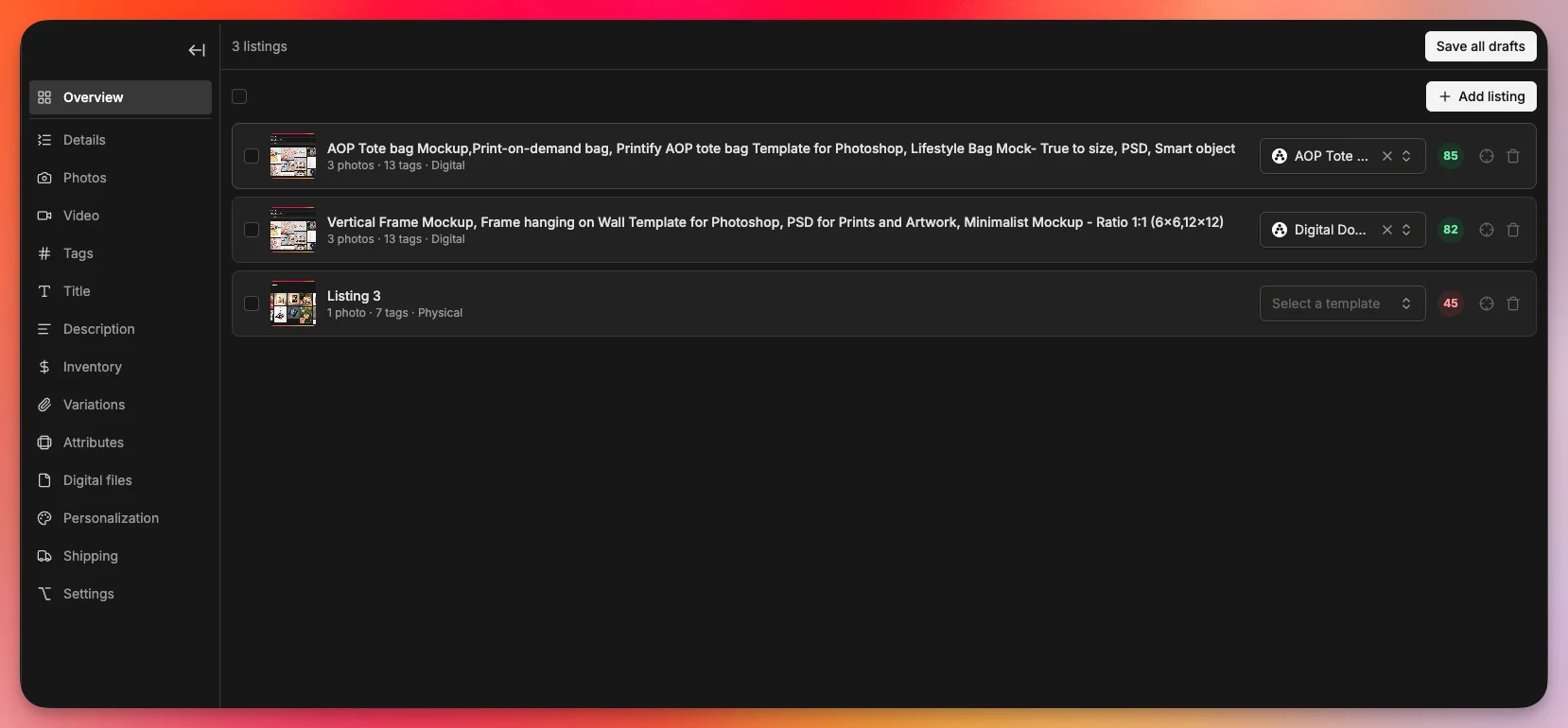
- Apply one template to the whole batch. Use it for what’s the same on all 40: category, shipping profile, return policy. Leave out anything your text files set. If the template’s missing one of those three, Listadum warns you.
- Read the five listings most likely to be wrong. Those are the longest title, the most photos, the digital one, the oddest folder name and the one you added last. If one’s wrong, the same mistake is probably in others.
- Save all as drafts, then publish or schedule. A teammate without “Can publish listings” stops at drafts, so you can check their batch before it goes live.
What goes wrong in a folder batch?
Mostly small things, repeated 40 times. Here are the five I’d watch for.
- Photos in the wrong order. Files sort by name as text, so 10.jpg lands before 2.jpg. Name them 01, 02 and on up to 10.
- Tags you wrote are gone. A template with tags replaces every tags.txt in the batch.
- Tags and titles get trimmed. Listadum cuts them to Etsy’s limits of 20 characters a tag and 140 a title, and keeps the first 13 tags. So “personalized birthday gift” becomes “personalized birthda”. Read tags.txt for anything long before you drag it in.
- Photos past the 20th don’t come along. Etsy allows 20 on a listing, so the first 20 by name stay, and Bulk Create tells you which folders lost some.
- You switch computers mid-batch. Bulk Create saves your work as you go, in that browser, and offers to pick it up for seven days. Let the uploads finish before you close the tab, and come back in the same browser.
Should you publish a whole batch on one day?
If it’s ready, yes. Etsy’s listing help sets no daily number, and there’s little to gain from holding finished work back.
There are two reasons you might spread it out anyway. One is renewals. Etsy listings expire after four months, so 40 listings published together come up together, and automatic renewal bills all of them at once. The other is search. On a 2018 podcast, Etsy staff said listings get “a small, temporary boost in search when they’re newly created or renewed”, and that renewing still isn’t “a very effective strategy” for improving your search ranking. So spreading them out keeps new listings arriving for weeks. Etsy hasn’t promised more than that.
To spread it out, choose Spread over time in the Listing Scheduler, then set the start date and how often one goes live.
Does it matter how a bulk tool connects to Etsy?
Yes, and I’d ask about it for any tool you’re considering. An app on Etsy’s API creates listings through Etsy’s own route, and Etsy’s API terms require its “prior approval” of what the app is for before it gets access. A tool that fills in the listing form in your logged-in browser isn’t an API app, so that approval doesn’t apply to it. Etsy’s Terms of Use, updated October 26, 2026, name browser extensions among the automated tools Etsy may “permit, condition, or prohibit”. Under the same terms, whatever an automated tool you authorize does is on you.
Bulk Create is an API app, built on Etsy’s official API. It isn’t endorsed or certified by Etsy.
Frequently asked questions
Is it possible to edit multiple Etsy listings at once?
Yes. On your Listings page, check the box next to each listing, then choose Editing Options. You can change titles, tags, descriptions, prices and shipping profiles, but photos aren’t on Etsy’s list. Our bulk edit guide covers the steps, and what to do when you outgrow them.
Can I bulk upload digital downloads to Etsy?
Yes, with Bulk Create. Put the download in a subfolder called files inside that listing’s folder, up to 5 files a listing. A file outside that subfolder is skipped, so a stray PDF won’t turn a physical listing into a digital one.
How many listings can I upload at once?
Bulk Create has no fixed limit on a batch. Bulk Copy takes up to 25 at a time.
How much does it cost to bulk upload listings to Etsy?
Etsy’s listing fee is $0.20 for creating or renewing a listing, so 40 listings cost $8. Bulk Create starts on Growth, which is $30 a month per shop, or $20 a month billed yearly.