
TL;DR
The Media Library is live in Listadum. Upload the images, videos and files you reuse across listings once, then pull them into any listing from the Listing Editor without leaving the page.
Star your regulars and they sit at the top of every tab.
It is also where images generated by Listadum AI now live, kept for 30 days unless you save them.
Available on Starter and above, with storage from 1 GB up to 25 GB depending on your plan.
The four files you upload over and over
Most shops have a handful of images that go on every single listing. A size chart. A care instructions card. An about-me image so buyers know there is a person behind the shop. A screenshot of a five-star review, because social proof sells.
They never change. And yet every new listing means going to find them again. Maybe they are in a folder on your laptop, maybe they are on your phone, maybe they are in a Drive folder you named something sensible two years ago. You dig, you download, you upload, you resize the window, you do it again next time.
Forty listings in, that is a lot of digging for four files that have not changed since January.
What shipped
The Media Library is one place to keep the images, videos and files you use across your listings.
Open Library in the sidebar to upload and manage everything. Then, when you are working on a listing, click the library button in the images section, the videos section, or the digital download files section, and your library opens right there. Pick the file, it is on the listing. No downloading, no re-uploading, no leaving the editor.
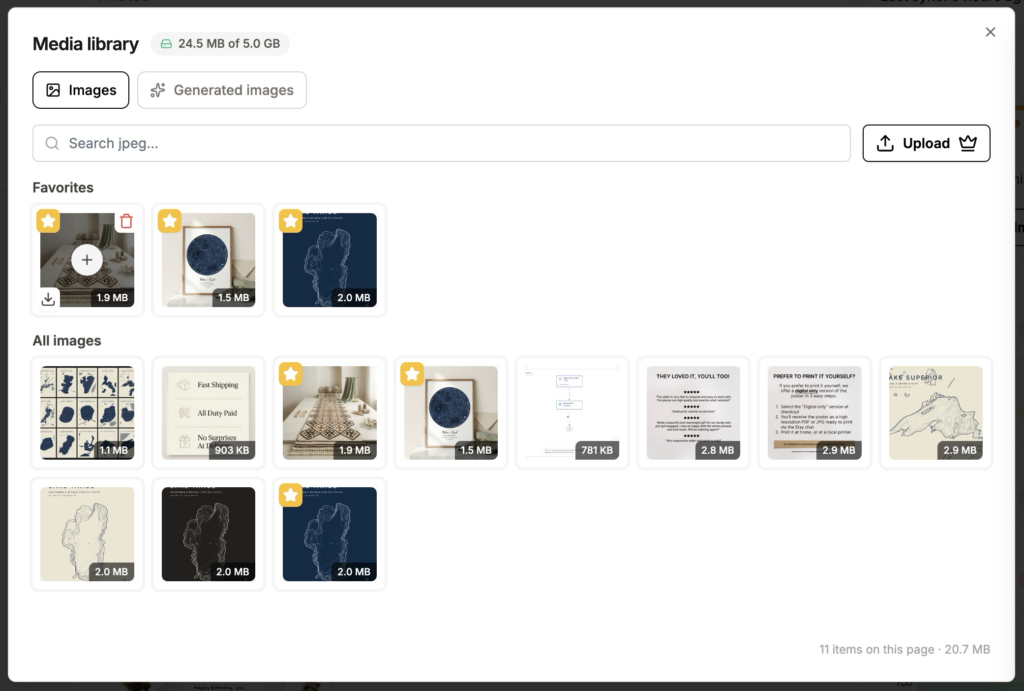
Using the same photo on ten listings does not cost you ten times the storage. It is stored once.
One thing worth being upfront about: your library starts empty. We do not pull your existing Etsy photos in automatically. If your size chart lives on a listing right now, download it once and upload it to the library, and that is the last time you have to think about it.
Star the ones you use every time
Hover over any file and click the star. Favorites get their own section at the top of the library, in every tab.
This is the part that turns a folder into a workflow. Star your size chart, your care card, your brand image and your review screenshot, and every new listing starts with those four sitting right there waiting for you. Two clicks each, and the boring half of building a listing is done.
Where your AI images live now
Images you generate with the AI Photo Editor or the Photo Studio get their own tab in the library.
Be clear on how this works, because it trips people up. Generated images are kept for 30 days, then they go and are lost forever if you haven’t used them in your listing, or saved them to the library. That tab is a working space, not storage. If you make something good and want to keep it, hover over it and click the plus button. It moves into your image library and stays until you delete it.
Generated images do not count against your storage while they sit in that tab. Only what you save does. And if you already added an image to a listing, that listing keeps its own copy, so nothing on Etsy changes when the 30 days are up.
The details worth knowing
Each shop gets its own library and its own storage. If you are running more than one Etsy shop, you will see a separate library for each, and there is no way to copy files between them yet. Same photo in two shops means uploading it twice for now.
Everyone on your team has access to the shop’s library, so a virtual assistant building listings can use the same approved images you would.
Images up to 20 MB (JPEG, PNG, GIF), videos up to 100 MB (MP4, MOV), and files up to 20 MB for digital downloads. Storage runs from 1 GB on Starter up to 25 GB on Max, and you can see what you have used at the top of the Library page.
Start with your four files
If you are already on Listadum, open the Library, upload the images that go on every listing, and star them. It takes five minutes and you will feel it on the next listing you build.
If you are not on Listadum yet, you can create a free account, choose Starter or above, and set your library up before you build your next batch of listings.
FAQ
Does the Media Library import my existing Etsy photos?
No. It starts empty, and everything in it is what you put there. To get an existing listing photo into your library, download it from the listing and upload it once. After that it is available on every listing.
How much storage do I get?
1 GB on Starter, 1 GB on Pro, 5 GB on Growth and 25 GB on Max. You can check your usage at the top of the Library page.
Is the Media Library available on the free plan?
You need a paid plan to add media to your library. It is available on Starter and above.
What happens to AI-generated images after 30 days?
They are removed from the Generated images tab. Any listing that already uses one keeps its own copy, so your listings are not affected. To keep an image for good, hover over it and click the plus button to save it to your library.
If I delete an image from my library, does it disappear from my listings?
No. Your listings keep their own copy. Deleting from the library only means you cannot reuse that file from the library any more.
Can I use the same library across my shops?
Not yet. Each shop has its own library and its own storage, so you would need to upload the file to each shop.
Can my virtual assistant use the library?
Yes. Everyone on your team has access to the shop’s library.