
Part of our Niche Playbooks guide. Pairs with the print-on-demand playbook.
You have seen the videos. Make a planner once, upload it, and wake up to $10k a month in passive income. There are fifty influencers selling that exact dream, usually right before they sell you their course on it.
Here is the part they leave out: most digital sellers on Etsy make very little. Not because the model is broken, but because they did what the video said, listed a “budget planner” like everyone else, and disappeared into a sea of ten thousand identical listings. The dream is real for a few and quietly disappointing for the many.
So let me level with you. Digital products genuinely are the best margin structure on Etsy: you make it once and sell it a thousand times with no inventory, no shipping, no trip to the post office. But that same ease is exactly why it is so crowded, and why “just upload it” does not work.
The sellers who actually earn do not win on price or luck. They win on being more specific, more usable, and easier to find than the listing next to them. This guide shows you how, with the real numbers behind every step: what actually sells right now, what it honestly earns, what it costs to run, and how to price so the good margin stays good.
Quick answer: is selling digital products on Etsy worth it?
Yes, if you niche down. A digital download has no unit cost, so after Etsy’s fees you keep most of the price. Here is a $12 sale, start to finish:
| $12 planner sale | |
|---|---|
| List price | $12.00 |
| Listing fee | −$0.20 |
| Transaction fee (6.5%) | −$0.78 |
| Payment processing (3% + $0.25, US) | −$0.61 |
| You keep | $10.41 (87%) |
No restocking, no shipping, no packaging. Just the fees, then the rest is yours.
The catch is traffic, not production. You can sell infinite copies, but only if people find the listing. So the whole job is: pick a specific product a real buyer is searching for, merchandise it with mockups that sell, price on value, and get it found.
In this guide:
- What digital products actually sell on Etsy right now (real bestseller data)
- How much you can realistically make, in honest ranges
- How to niche down past the crowded term
- How to price, and how to price higher
- What it really costs to run a digital shop (tool subscriptions included)
- Mockups, file delivery, and licensing
- The mistakes that quietly kill digital shops
- A full worked example, generic listing rebuilt
What digital products sell best on Etsy right now
Instead of guessing, we pulled the current Etsy bestsellers for “digital download” and read the real demand off the free Listadum extension: views, favorites, and how recently each was listed. We kept only listings under a year old and ranked them by estimated daily views. Here is what is selling in mid-2026.
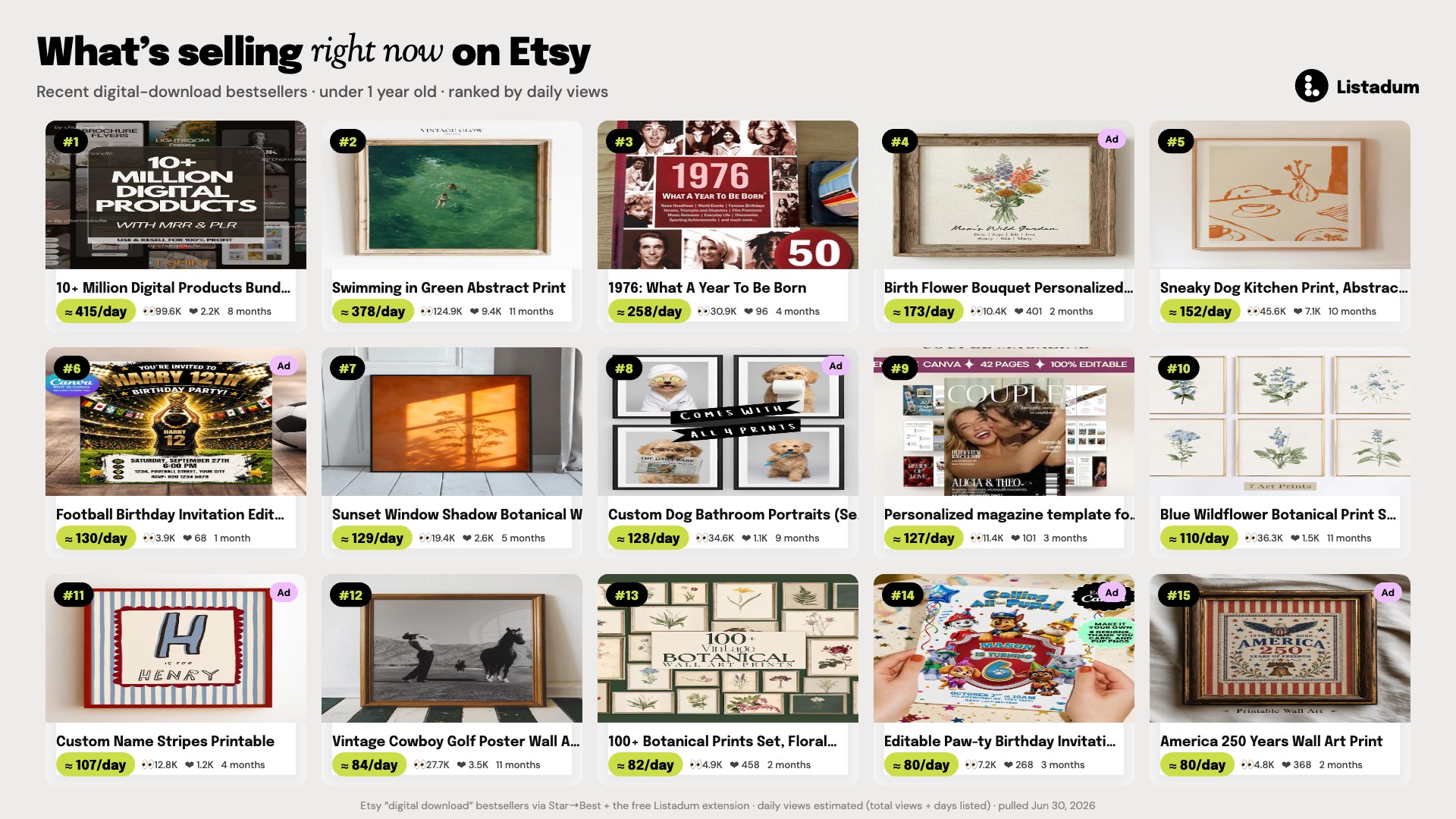
A few patterns jump out, and they are your real “what to make” map:
- Printable wall art is the engine. Botanical and floral prints, vintage art reproductions, abstract “sneaky dog / sneaky cat” kitchen prints, sunset window-shadow prints. More than half the board is wall art. It is the single biggest digital niche, and it rewards a distinct style.
- Editable party templates (Canva). Birthday, baby shower, and bridal shower invitations. Almost all of these were running ads, which tells you the category is competitive and sellers are paying to compete. Enter it with a specific theme, not a generic template.
- Personalization wins. Birth-flower prints, custom pet portraits, custom name stripes, a couples “magazine” template. The pattern is proven product plus a name or a face. Same effort, higher price, almost no competition on the exact search.
- Bundles rank on volume. Themed print sets (“100+ botanical prints”) and mega digital bundles show up near the top. A set feels like more value than a single file and lifts your order value.
- Timely and seasonal listings punch above their weight. A “1976: What a Year to Be Born” 50th-birthday book and an “America 250 / 4th of July” print were young listings with high daily views. Anchoring to a birth year, an anniversary, or the 2026 US semiquincentennial gives a brand-new listing a running start.
One thing to avoid: the very top result was a “10+ million digital products” mega resell bundle. Those private-label-rights dumps get views, but they are a spammy, low-trust corner of the market and a magnet for refunds and takedowns. Build something you own instead.
Data: Etsy “digital download” bestsellers via the Star to Best filter plus the free Listadum extension. Daily views and sales are estimated (roughly 1% of views convert). Pulled June 30, 2026.
Top niches for digital downloads to sell on Etsy
The board above is what is selling this week. Zoom out, and a handful of niches carry the whole category year-round. Here are the ones with real, repeat demand in 2026, each with the specific angle that beats the saturated version. Generic is a race to zero; the sub-niche is where the money is.
- Clip art and cut files (PNG / SVG). The quiet giant. Clipart sets and SVG cut files for Cricut and sublimation are the most repeat-purchased digital products on Etsy, because crafters come back again and again. Generic “floral clipart” is buried; a tight themed set (retro Halloween cats, boho birth-flower line art, Western sublimation PNGs) sells. Package them as 20-file bundles at $5 to $12, not singles at $2.
- Digital and printable planners. Steady all year, with New Year and back-to-school peaks. “Daily planner” is a bloodbath; win with a system built for one person, like a meal-prep planner for macro counters or a launch planner for indie authors.
- ADHD and neurodivergent planners. One of the most under-served niches right now. The plain “ADHD planner” is getting crowded, but specific systems (a body-doubling routine planner, a low-overwhelm “one thing today” sheet, a task-initiation card deck) have almost no competition and a loyal, word-of-mouth audience.
- Kids and classroom activities. Three buyer groups at once: teachers (lesson plans, classroom decor), parents (homeschool worksheets, road-trip activity packs), and students (study schedules, flashcards). Age-specific and theme-specific wins: “quiet-time busy book for 3-year-olds,” not “kids printables.”
- Canva social media templates. Small business owners and coaches buy Instagram, Pinterest, and Facebook template packs to look professional without hiring a designer. Niche by industry: templates for realtors, for nail techs, for wedding photographers.
- Party and celebration printables. A perennial, because every birthday, shower, and graduation is a buying event with a deadline. Editable invitation suites and matching decor kits, sold by theme, win on urgency.
- Budget and finance templates. Google Sheets and Excel trackers, from zero-based budgets to debt-snowball and sinking-fund planners. Buyers want a working system, not a pretty blank grid.
- Fonts, presets, and AI-prompt packs. The “tools for other creators” corner: handwritten fonts, Lightroom presets for a specific look (moody film, bright-and-airy newborn), and ChatGPT prompt packs for a job (Etsy sellers, teachers). Small files, high repeat.
Whichever you pick, the rule is the same: the niche gets you in the door, but the specific sub-niche is what actually sells.
How much can you actually make selling digital products?
Be careful with the big income screenshots you see on YouTube. Most “Etsy sellers make $X a month” numbers come from third-party blogs quoting averages across wildly different shops, so they tell you almost nothing about what you will make. The honest way to think about it is per-sale economics times traffic.
Per sale. Take the net margin from the fees above. A few realistic price points, after US Etsy fees:
| List price | Etsy fees (approx.) | You keep | Net margin |
|---|---|---|---|
| $5 print | $0.78 | $4.22 | 84% |
| $12 planner | $1.59 | $10.41 | 87% |
| $20 template bundle | $2.15 | $17.85 | 89% |
| $38 course-style kit | $3.32 | $34.68 | 91% |
Fees: $0.20 listing + 6.5% transaction + 3% + $0.25 US processing. Offsite Ads (12 to 15%, capped at $100/order) apply only when Etsy sources the sale. Source: Etsy fee policy.
Times traffic. Now the honest part: revenue is that margin multiplied by how many people find you. A single listing getting 130 daily views (a strong performer from our bestseller pull) at a 1% conversion is about 1.3 sales a day. On a $12 planner, that is roughly $14 a day, or about $410 a month, from one strong listing. Most listings do far less. The sellers earning real money run dozens of genuinely different listings, each catching its own searches, not one listing they hope goes viral.
So the realistic picture: a new digital shop with a handful of listings might make $0 to $100 in a month while it finds traction. A shop with 30 to 50 well-optimized, differentiated listings can reach a few hundred to a few thousand dollars a month. The lever is not luck, it is the number of specific listings ranking for real searches.
Get specific: niche down past the crowded term
The single biggest lever in digital products is specificity. A generic product competes with everyone. A specific product competes with almost no one, and speaks directly to the buyer who needs exactly that.
Do not sell a “budget planner.” Sell:
- A zero-based budget planner for irregular freelance income (commission, tips, uneven paychecks).
- A wedding seating chart template for a specific guest count and style.
- A GoodNotes habit tracker for shift workers whose weeks are not Monday to Friday.
See the difference? The specific version is easier to make well (you understand one buyer deeply), easier to rank for (the search is less crowded), and easier to price (it is not a commodity). The quickest way to find your angle is to research the broad term on Etsy, see what is already saturated, and carve out the slice nobody is serving well.
How to price digital products on Etsy
Because your marginal cost is near zero, it is tempting to price low to win the sale. Resist it. Price on the value you deliver, not the seconds it took to copy a file.
- Anchor to value, not effort. A planner that genuinely solves a problem is worth more than a prettier blank template. Price for the outcome.
- Check the band, then sit at the top of it. Look at what the specific (not generic) competitors charge, and price at the upper end if your mockups and reviews back it up. Cheapest rarely wins on Etsy; it just signals “low quality.”
- Use charm pricing. $19.97 reads meaningfully lower than $20 to most buyers. Small trick, real lift.
- Run sales deliberately, not permanently. Occasional promotions attract buyers; a standing discount just resets your price in shoppers’ minds.
Strategies to price higher (without losing the sale)
Most digital sellers leave money on the table by pricing like they are selling a file. You are actually selling a solution and a bit of the buyer’s time back. Here is how to raise the price the listing can hold:
- Bundle related products. A single wedding invitation is a $6 sale. The invitation plus RSVP, details card, and thank-you, as an editable suite, is a $24 sale. Same buyer, one checkout, four times the order value.
- Sell tiers, not one price. Offer a personal-use version and a commercial / small-business license at a higher price. Buyers who resell or use your art in their own products will happily pay more, and it is pure margin.
- Make it editable, then charge for it. A flat printable is cheap. The same design as an editable Canva or Corjl template the buyer can personalize themselves is a premium product, because it saves them hiring you.
- Add a done-for-you upgrade. Offer the template free-to-edit at one price and a “we personalize it for you” add-on at a higher one. Some buyers want the DIY, some want it handled.
- Merchandise the value. A listing that clearly shows 30 pages, 6 color options, and both A4 and US Letter looks worth more than one that shows a single thumbnail. Price follows perceived depth.
The pattern across all five: give the buyer a reason the higher number is obviously fair, and most will take it.
What it actually costs to run a digital shop
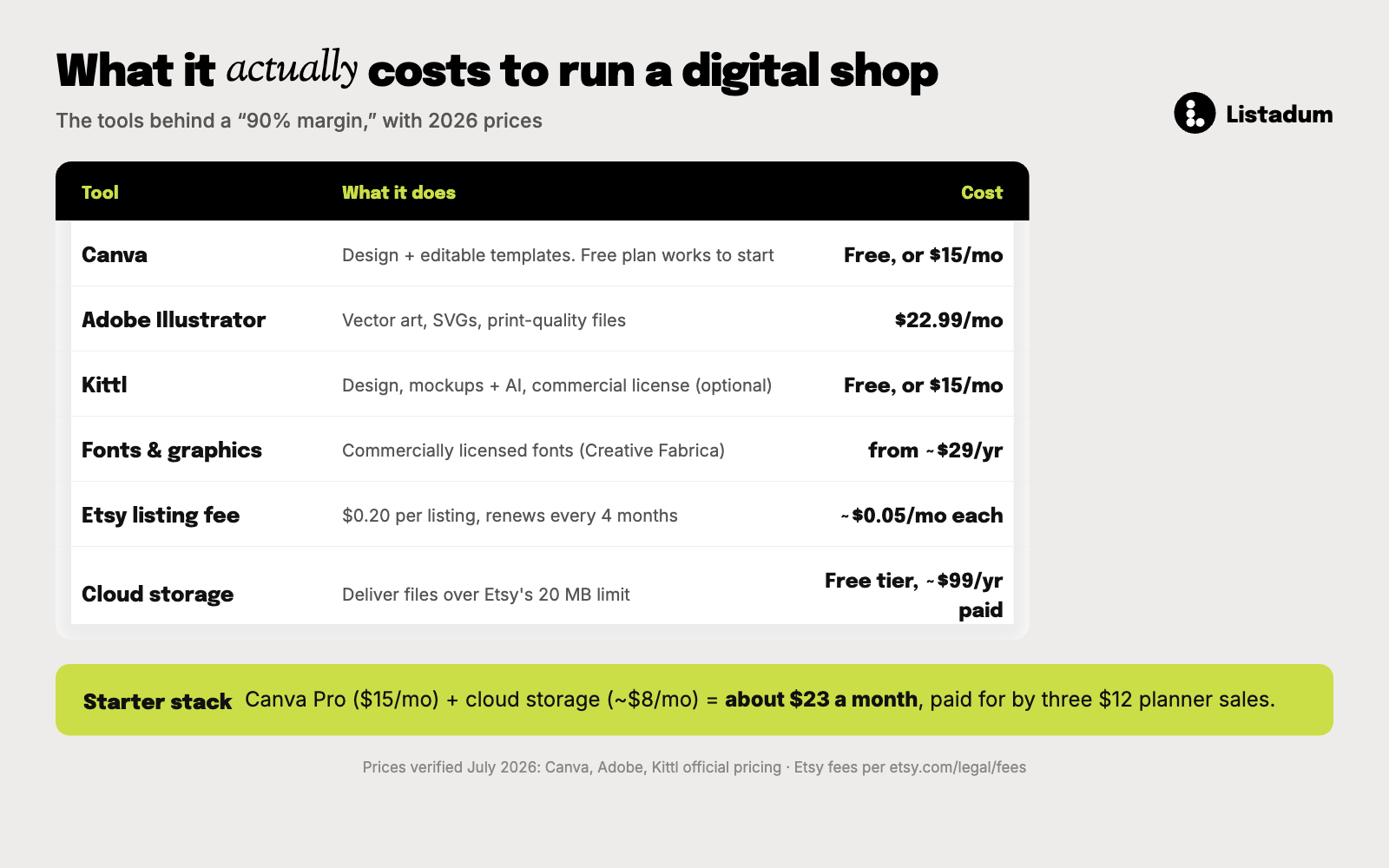
“90% margin” is true per sale, but it ignores the tools you need to design and deliver. None of these are huge, and there are free paths, but budget for them so your pricing holds up. Current 2026 prices:
| Tool | What it does | Cost |
|---|---|---|
| Canva | Design + editable templates. Free plan works to start | Free, or $15/mo ($120/yr) for Pro |
| Adobe Illustrator | Vector art, SVGs, print-quality files | $22.99/mo (annual) |
| Kittl | Design, mockups + AI, commercial license | Free, or $15/mo ($10/mo annual) |
| Creative Fabrica / fonts | Commercially licensed fonts and graphics | From ~$29/yr |
| Etsy listing fee | $0.20 per listing, every 4 months | ~$0.05/mo per listing |
| Cloud storage | Deliver files over 20 MB (Google Drive, Dropbox) | Free tier to start; ~$99/yr for a paid plan (e.g. Google One 2 TB) once your library grows |
A realistic starting stack is Canva Pro ($15/mo) plus cloud storage for delivery (about $8/mo once you outgrow the free tier), so roughly $23 a month. Cloud storage is the one you cannot skip, since it is how you deliver anything over Etsy’s 20 MB limit, though its free tier gets you started for nothing. Design and mockup tools like Kittl are optional and can wait until you are earning. If you sell even three $12 planners, the stack is paid for and the rest is profit. The mistake is not the cost, it is forgetting it exists and pricing as if the margin were 100%. (You can see any listing’s real take-home with Listadum Cha-Ching, which shows your profit after fees right on the listing.)
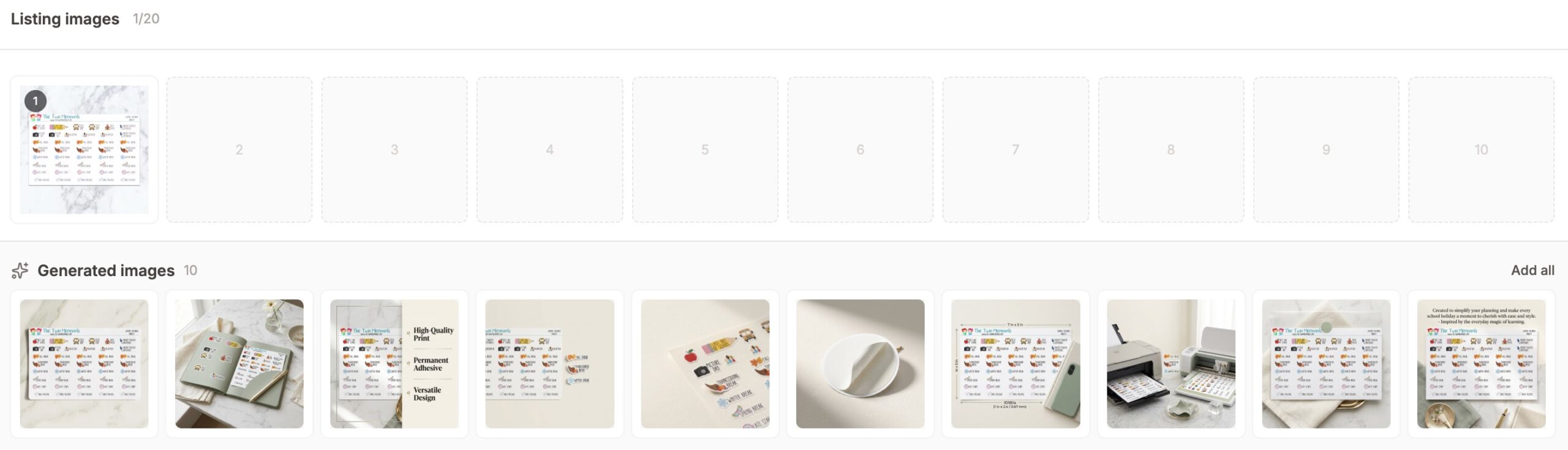
Make mockups do the work
With a digital product there is nothing physical to photograph, so your mockups are the entire product experience the buyer sees before they buy. Weak mockups are why good products do not sell.
Show them what they are actually getting:
- The result. The printable framed on a wall, the planner open on a tablet, the template filled in with real-looking content.
- Every page or variation. Buyers want to see all of it before they commit. Show the full set, not one teaser.
- The in-use context. A resume template on a desk, a sticker sheet partly used. Help them picture it in their life.
Design and mockup tools like Kittl and Artadum make this fast, and our free Etsy Listing Image Playbook covers the full image sequence.
Free Etsy SEO Guide. Digital products live or die on search. Get the whole picture, titles, tags, descriptions, and photos, in one free guide you can work through listing by listing.
Spell out exactly what the buyer gets
Most digital refunds and angry messages come from one thing: the buyer did not understand what they were buying. They expected an editable file and got a flat PDF, or did not realize they needed a specific app.
Remove every bit of doubt in the listing:
- File type and format. PDF, PNG, SVG, Canva template, GoodNotes file. Say it plainly.
- Sizes and dimensions. A4 and US Letter, specific pixel dimensions, which paper sizes are included.
- What they need to use it. “Editable in free Canva,” “for GoodNotes or Notability,” “print at home or at a print shop.”
- Instant download, and how to access it. Reassure them it is immediate and tell them where the files appear.
On the technical side: Etsy lets you attach up to 5 files at 20 MB each. If your product is larger, host the files in the cloud (Dropbox or Google Drive) and upload a PDF with access instructions in the download slot.
On licensing and refunds:
- State the license clearly. Personal use only, or commercial use allowed? Put it in the listing so there is no dispute later, and price the two differently.
- Handle the “no refunds” reality kindly. Etsy treats most digital items as non-returnable, so a clear, accurate listing up front is your real refund protection. When a genuine mistake happens, a quick, generous reply earns the review.
Treat traffic as your real constraint
The product can be infinite, but your traffic is not. You can sell a thousand copies, but only if a thousand people find the listing. For digital sellers, search visibility is the whole game.
Two levers:
- SEO on every listing. Titles and tags built from phrases buyers actually search. A keyword tool like Listadum’s Keyword Explorer shows which specific terms are in demand and winnable, so you are not guessing. The full method is in our guides to Etsy SEO and writing tags that get found.
- Volume of differentiated listings. More good, genuinely different listings means more search surface. The key word is different: forty variations of the same planner cannibalize each other, while forty distinct products each catch their own searches.
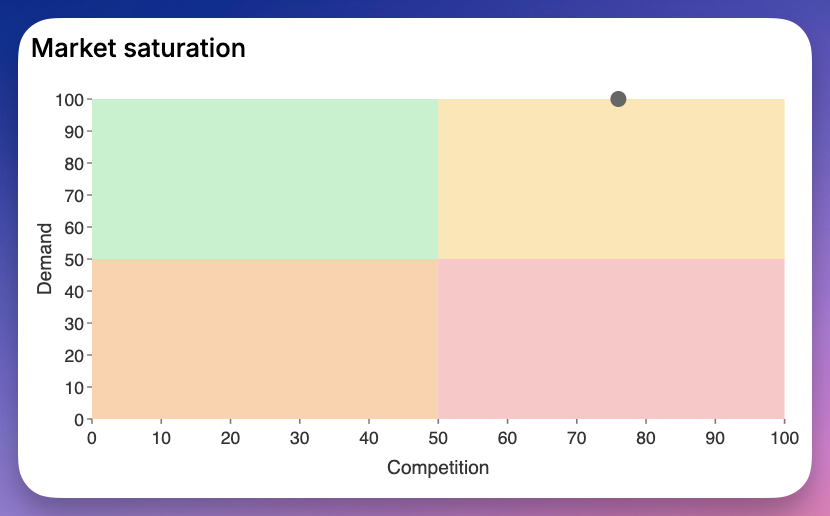
Find the digital searches you can win. Listadum’s Keyword Explorer scores every phrase by demand and competition, so you build listings around terms you can actually rank for.
Common mistakes and pitfalls to avoid
Most stalled digital shops are making one of these:
- Selling the generic term. “Budget planner,” “wedding invitation,” “wall art” with no angle. You are invisible against thousands of listings. Niche down, always.
- Reselling PLR / mega bundles. Those “10 million products” dumps look like easy money and are a fast track to bad reviews, refunds, and takedowns. Sell work you actually made.
- One thumbnail, no page previews. Buyers will not gamble on a file they cannot see. Show every page and an in-use mockup.
- Vague file descriptions. Not saying the format, size, or app needed. This is the number one source of refund requests and angry messages.
- Pricing at the effort, not the value. Racing to $2 because “it only took a minute” trains buyers to see your shop as cheap and erases your margin.
- Ignoring licensing. No stated license means disputes when someone resells your art, and a missed chance to charge more for commercial use.
- Forty near-duplicate listings. They cannibalize each other’s search rank instead of expanding your surface. Make them genuinely different.
- Set and forget. Digital listings expire every 4 months and search trends move. Refresh titles, tags, and mockups on your slow sellers.
Worked example: a generic listing, rebuilt
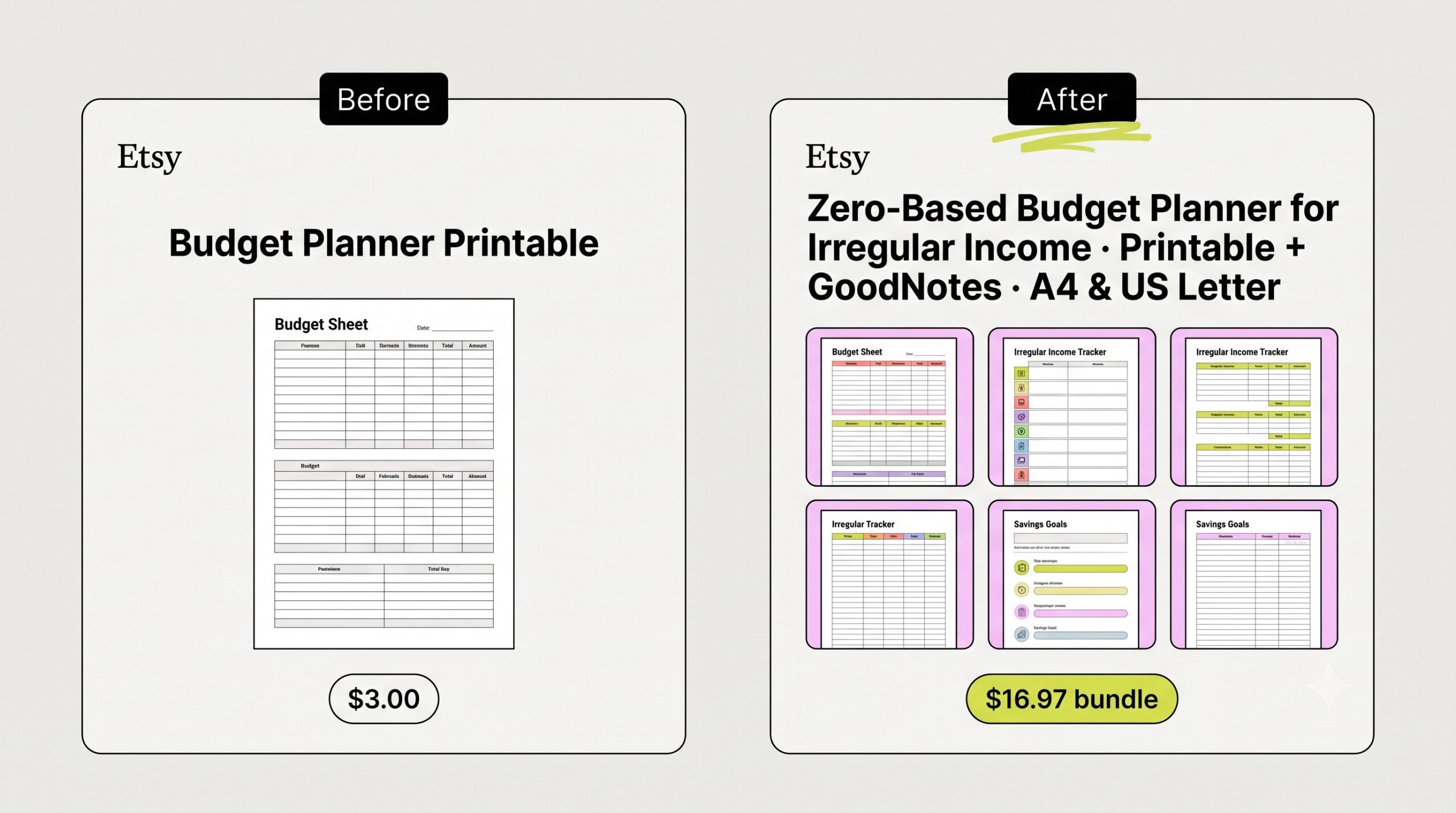
Here is a typical weak digital listing:
Title: Budget Planner Printable
It is the single most competed term in the category, with no specificity and nothing that makes a buyer choose it.
Now the rebuilt version, niched down and merchandised:
Title: Zero-Based Budget Planner for Irregular Income, Printable + GoodNotes, Instant Download, A4 and US Letter
Tags (all 13, each 20 characters or fewer, no repeated words):
- budget planner
- irregular income
- printable finance
- goodnotes template
- money tracker
- debt payoff sheet
- paycheck organizer
- freelancer tool
- savings chart
- monthly bills log
- digital download
- instant pdf
- self employed kit
Price: $9.97 solo, or $16.97 as a bundle with a debt-payoff tracker and savings-goal sheet.
Same effort to make, but now it speaks to one specific buyer (freelancers with uneven income), it is clear about format and sizes, its tags target searches that are winnable instead of fighting the whole category, and the bundle nearly doubles the order value.
FAQ
How do I start selling digital products on Etsy?
Pick a specific niche rather than a crowded generic one, create the file well, and merchandise it with strong mockups that show the result and every page. Spell out exactly what the buyer receives, build your titles and tags from real searches, and price on value rather than racing to the bottom.
What digital products sell best on Etsy?
Right now the top sellers are printable wall art (botanical, vintage, abstract), editable party templates (birthday and shower invitations in Canva), personalized prints (birth flowers, pet portraits, custom names), and themed print bundles. Within any of these, the specific, well-targeted version outsells the generic one.
How much can you make selling digital products on Etsy?
It depends on traffic, not production. Per sale you keep about 84 to 91% after Etsy’s fees. One strong listing at ~130 daily views and 1% conversion is roughly $400 a month on a $12 product, but most listings do far less. Sellers earning real money run dozens of differentiated listings rather than betting on one.
Are digital products profitable on Etsy?
Yes, they have the best margin structure on Etsy since you create once and sell infinitely with no inventory or shipping. Budget for tool subscriptions (a Canva Pro plus cloud storage stack is about $23/month) and factor Etsy’s fees into your price. The real constraint is competition and traffic, so be specific and findable rather than cheap.
How do I price digital products on Etsy?
Price on the value you deliver, not the time to copy a file. Anchor to the outcome, sit at the top of the band your mockups and reviews can support, and use charm pricing like $19.97. Raise the price with bundles, editable versions, and commercial-use license tiers rather than discounting.
How do I deliver large digital files on Etsy?
Etsy allows up to 5 files at 20 MB each. If your product is larger, host the files in the cloud (Dropbox or Google Drive) and upload a PDF with access instructions in the download slot. Always make the access steps clear in the listing.
How do I get my digital listings found on Etsy?
Treat search as your main constraint. Put real, specific keywords in your titles and tags, and build a range of genuinely different listings rather than duplicates. A keyword tool that scores demand and competition helps you target terms you can actually rank for.
Digital products live or die on search.
Connect your shop to Listadum free and see which listings are missing keywords or tags, with a fix suggested for each, so your best-margin products actually get found.
Free plan · no credit card · connect your real Etsy shop in minutes
Explore more
Etsy Seller Handbook · Etsy fee policy · Canva · Kittl · Creative Market · Unsplash · TinyPNG
Related: Niche Playbooks guide · Print-on-demand playbook