


Last updated: October 10, 2026 · By Neha Chandelier, Co-founder of Listadum
Everywhere I look, AI is changing how work gets done. People around me use it to write code, plan trips, and answer their email. So I kept asking myself: why shouldn’t it work on my Etsy shop too?
For a long time, I was disappointed with the answer.
I’d ask ChatGPT how to run a more profitable shop and get back advice that could fit any shop on Etsy. Use better keywords. Take brighter photos. Write a clearer description. It felt like it was guessing, not giving me concrete steps for my listings.
It was guessing. It couldn’t see my shop.
MCPs changed that. An MCP lets Claude or ChatGPT connect to your real shop through Listadum. Now it reads my actual listings, sales, reviews, and Etsy search numbers before it says a word. The advice is about my shop: this listing, this tag, this price.
Since then, I’ve launched hundreds of listings, tracked niches, and built playbooks for what to make next. All of it with AI, and all of it backed by real data instead of guesses. (The bulk launches ran through the Listadum API. I’ll show you how in use case 9.)
Here are the 10 ways I use it now, with the exact prompts, so you can copy them straight into your own chat.
TL;DR
- Connect, don’t paste. The Listadum MCP lets Claude or ChatGPT read your real listings, sales, reviews and Etsy search data.
- Built for big catalogs. It pays off once you have 100+ listings and not enough hours.
- Start with a niche playbook. Let it score niches on real demand before you make anything.
- Change listings in batches. Ask for a before and after table, approve 10 at a time.
- Put repeat work on a schedule. A Monday report in Claude needs no code.
- Use the API for volume. Bulk launches from a CSV need Claude Code basics.
- Stay in charge. Say “don’t change anything yet” until you’ve seen the change.
Who this is for
This isn’t a beginner guide. If you have 12 listings, you can do all of this by hand, and you should.
This is for you if your catalog has outgrown you. You have 100, 300, maybe 500 listings. You make sales most days. You already fixed your tags and titles, and you know your completion scores. The problem now is time: there’s more work in your shop than there are hours in your week.
That’s exactly where connecting AI to your shop pays off. Sellers using the Listadum API average over 500 active listings, more than double our other paying shops. The bigger the catalog, the more work there is to hand off.
A good way to think about it: the AI can’t make a listing sell. What it can do is the work of running the listings, across your whole catalog, in minutes.
What “connecting” actually means
MCP stands for Model Context Protocol. You don’t need to remember that. Think of it as a safe doorway: it lets your AI assistant use Listadum’s tools on your behalf, and only after you sign in to approve it.
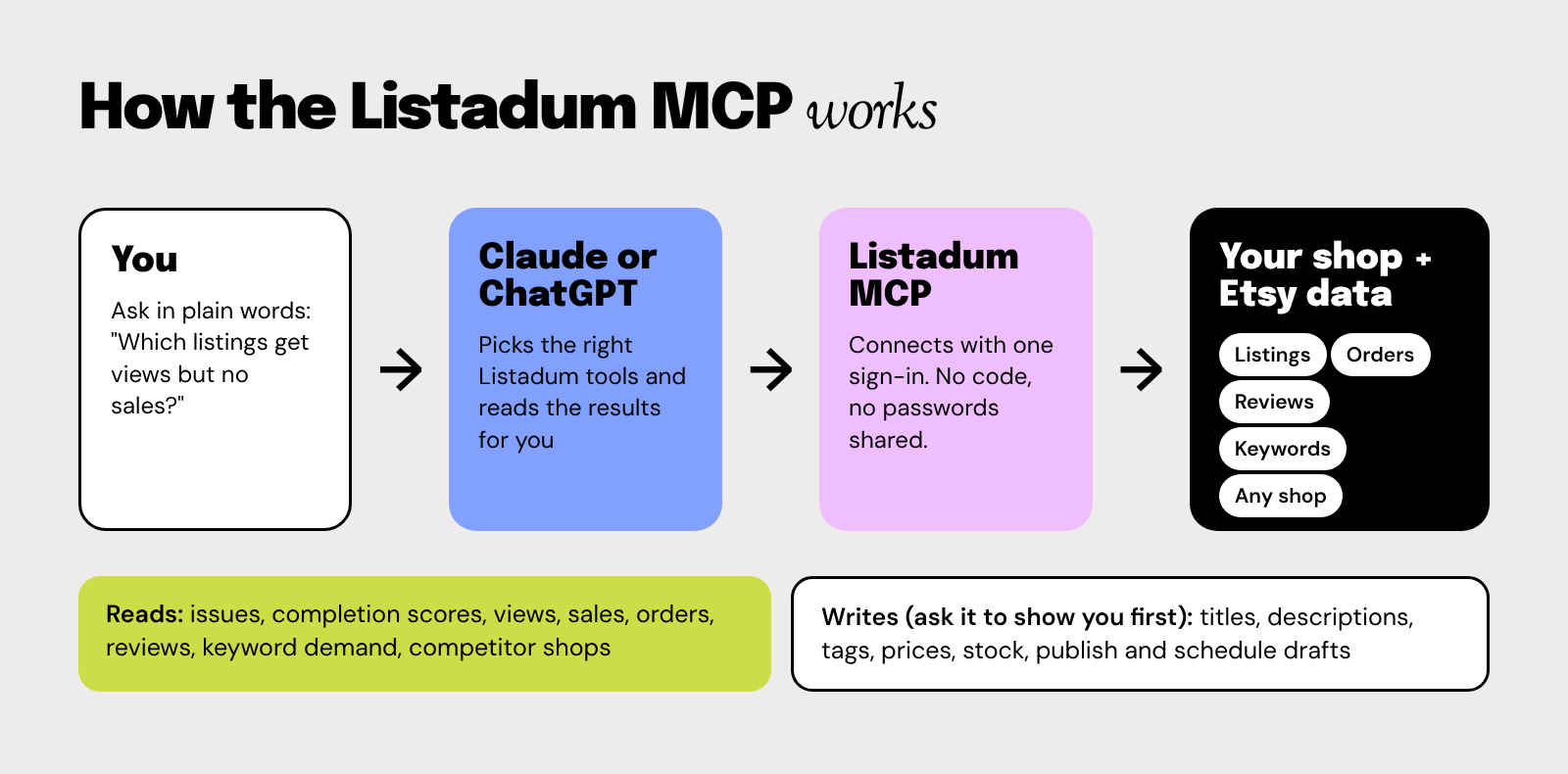
Here’s what it can do once you connect:
- Read your shop: listings, completion scores, detected issues, views, sales, orders, and reviews.
- Read Etsy: search demand and competition for any keyword, plus public numbers for any shop.
- Make changes you approve: titles, descriptions, tags, prices, stock, and publishing or scheduling drafts.
One thing it can’t do yet is create a brand new listing from scratch. Editing, publishing, and scheduling existing drafts all work.
Set it up in about 5 minutes
You need a paid Listadum plan with API access. It’s a $10/month add-on on Starter or Growth, and it’s included on Max. The MCP uses the same access, so there’s nothing extra to buy. Details are on the MCP integration page.
In Claude (web or desktop):
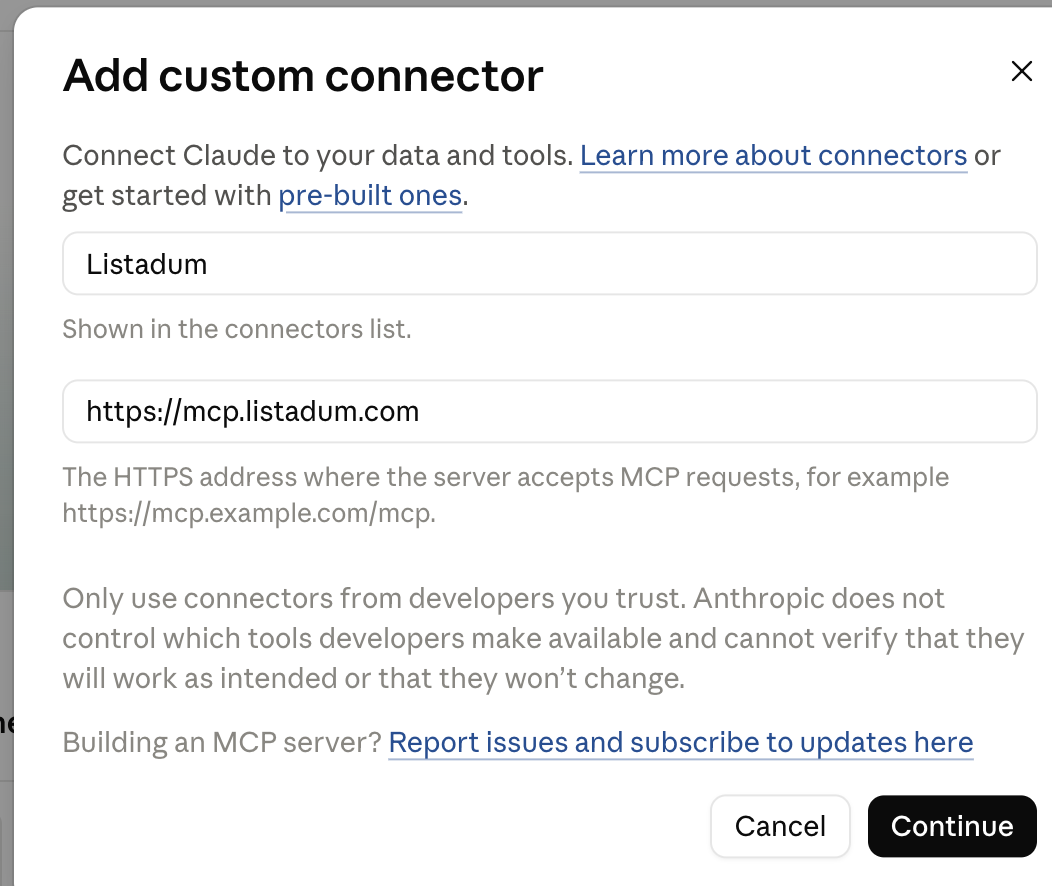
- Go to Customize › Connectors, click Add, then Add custom connector.
- Name it Listadum, paste
https://mcp.listadum.com, and click Continue. - Sign in to approve it, then turn on the Listadum tools in a new chat.
In ChatGPT:
- Go to Settings › Apps › Advanced settings and turn on Developer mode.
- Click Create app, name it Listadum, and paste
https://mcp.listadum.com. - Sign in to approve it.
If ChatGPT doesn’t seem to use the tools, switch the chat to Thinking mode. Instant mode sometimes skips them.
In Claude Code: run claude mcp add --transport http listadum https://mcp.listadum.com, then type /mcp to sign in.
Then test it with three quick prompts:
- “What Listadum tools can you use?”
- “Summarize my connected Etsy shop in Listadum.”
- “Which listing issues should I fix first?”
If you run more than one shop, the second prompt covers all of them at once. Full steps are in the MCP guide in the Listadum help center.
Running your shop through chat (MCP)
Each one has the prompt to copy, what the AI pulls, and the one thing to watch.
1. Build a niche playbook: what to launch next
Fixing listings is the easy part. Deciding what to make next is the hard part. It’s the question I get stuck on most, and it’s where I use Claude the most.
I ask Claude to build me a niche playbook, and it does the research through the Listadum MCP. Here’s a real one it made for me:
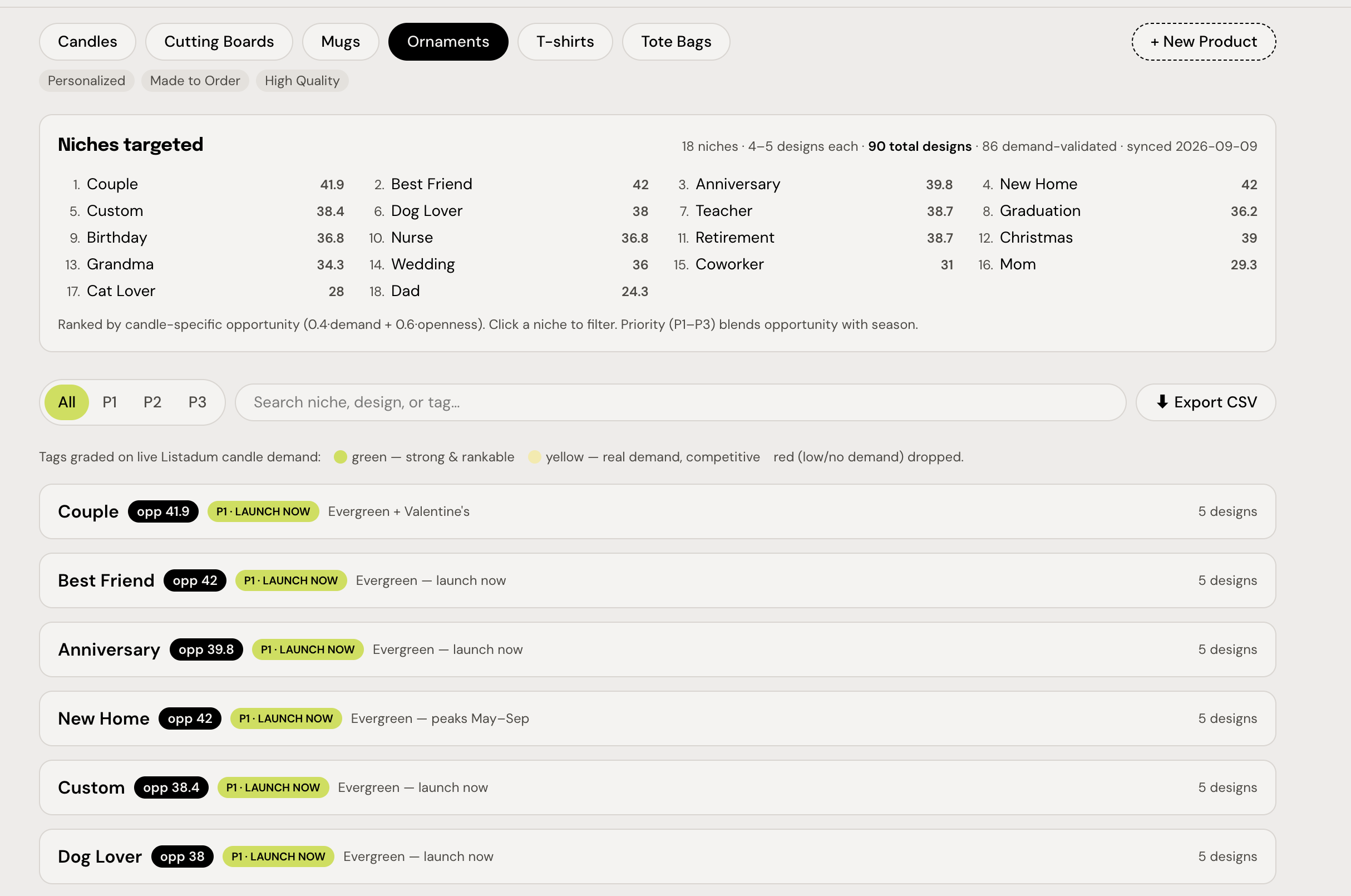
Here’s what’s in it:
- One tab per product type: candles, cutting boards, mugs, ornaments, t-shirts, tote bags.
- A ranked list of niches. This ornament playbook has 18: couple, best friend, anniversary, new home, dog lover, and so on. Each gets an opportunity score that weighs demand and how open the market still is (I weight openness higher, 60/40).
- A launch priority. P1 means launch now, and it blends the score with the season. “Couple” is evergreen with a Valentine’s bump, so it’s P1 today.
- Ready-to-use designs inside each niche. Take “Long Distance” in the couple niche: demand in the 92nd percentile, competition in only the 19th, an opportunity score of 85.4, and about $1.7k a month in estimated sales. The title is already written (115 of 140 characters) and all 13 tags are filled.
- Every tag graded on live Listadum data. Green means strong and rankable, yellow means real demand but competitive, red gets dropped before it ever reaches me.
- 90 designs, 86 checked against real demand, one export button. The CSV feeds straight into my listing uploader (use case 9).
That’s the difference. A chatbot on its own gives you “try personalized gifts.” This gives you which niche, which product, which tags, and when.
You can see why it works at the keyword level too. Say aprons sell well for you:
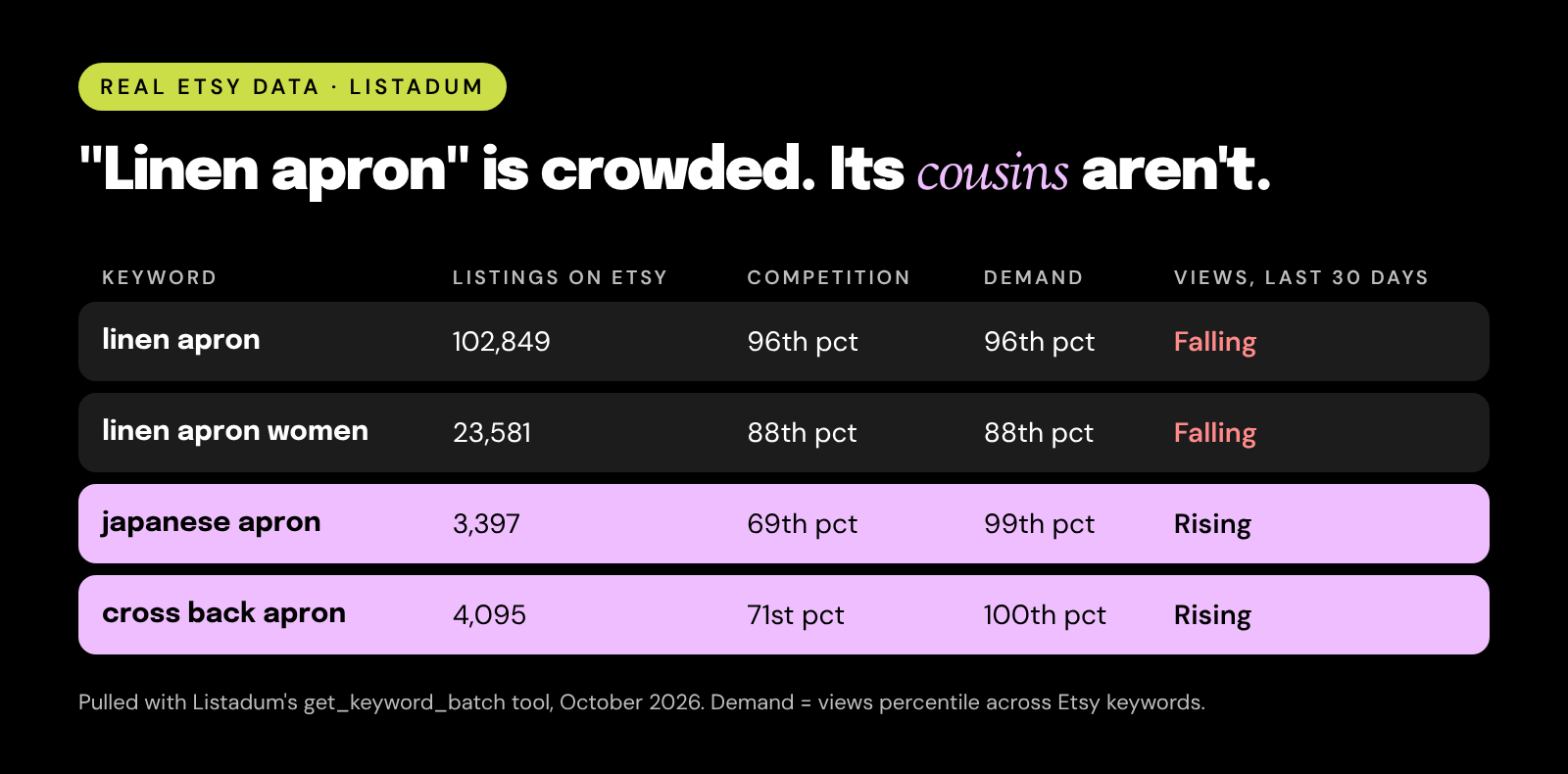
- “linen apron” has over 102,000 competing listings, and views are falling.
- “japanese apron” has about 3,400 listings, top-tier demand, and rising views, at about $44.
- “cross back apron” looks similar: about 4,100 listings, rising, around $41.
Same sewing machine, very different odds.
Copy this:
“Build me a niche playbook for [product type] using Listadum. Find 15 to 20 niches (who it’s for, or the occasion). For each, check the search demand and competition, and give it an opportunity score that weights openness 60% and demand 40%. Mark each niche P1, P2, or P3 based on the score and the season. Then suggest 5 designs per niche with 13 tags each, and grade every tag green (strong and rankable), yellow (real demand, competitive), or red (drop it). Put it all in a table I can export as a CSV.”
What it pulls: your sales, then demand, competition, 30-day trends, and average prices for every phrase, plus public numbers for the shops it checks.
Watch out for: treating it as a guarantee. A playbook shows where the demand is. Launch 3 to 5 listings, watch them for a few weeks, then go deeper.
2. Triage your whole catalog: what deserves your time
With 300 listings, the real question isn’t “what’s wrong with this listing.” It’s “which 20 listings should I spend this week on.” The AI can sort your entire catalog into buckets using real numbers.
Copy this:
“Go through all my active listings in Listadum. Using 30-day views, 30-day sales, completion score, and search demand for each listing’s main keyword, sort them into four groups: scale (selling, high demand), fix (views but few sales), retest (good demand but low views), and retire (no views, no sales, weak demand). Give me the top 10 in each group as a table.”
What it pulls: views, sales, completion scores, and detected issues for every listing, plus keyword demand.
Watch out for: seasonal listings. A Christmas ornament in July will look like a “retire.” Tell the AI to skip anything seasonal.
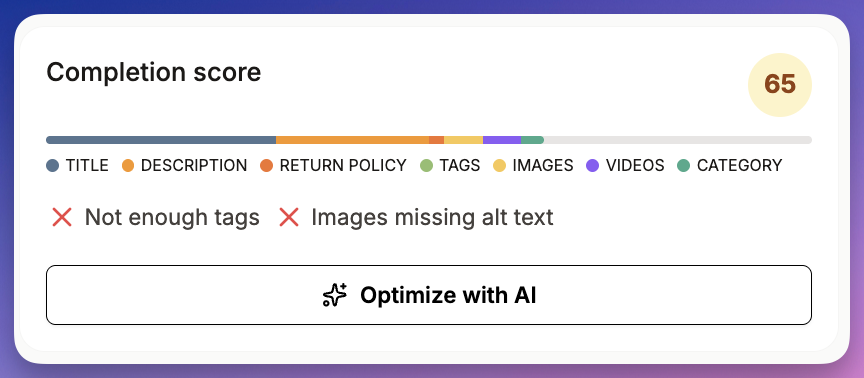
3. Refresh 50 listings in one sitting
This is where it stops advising and starts doing. Once you know which listings need work, the AI can rewrite them in batches, using real search data, and save the changes after you approve them.
Copy this:
“Take the ‘fix’ group from my triage. For each listing, check 5 to 10 search phrases in Listadum, then write a new title and 13 tags. Show me the first 10 as a before and after table. Don’t change anything until I approve.”
Then, once the table looks right: “Approved. Apply these 10, then show me the next 10.”
What it pulls: each listing, keyword demand and competition, then it saves your approved titles and tags.
Watch out for: tag changes replace the whole tag set. Approve in batches of 10, and spot-check a couple of listings on Etsy after the first batch.
4. Prune and retest dead listings
Every big catalog has listings that haven’t sold in a year. Some deserve a second chance with a new title. Some should go. The AI can tell you which is which.
Copy this:
“Find my active listings with zero sales in the last 180 days. For each, check the search demand for its main keyword. Split them into ‘worth retesting’ (real demand, the listing just isn’t getting found) and ‘let go’ (weak demand). For the retest group, draft a new title for each.”
What it pulls: your sales history, listing details, and keyword demand.
Watch out for: it can’t deactivate listings for you yet. Use the list to deactivate in bulk yourself, and let the AI handle the retitling.
5. Reprice your catalog against the market
Most of us set prices once and never look again. Listadum knows the average price of the top listings for any search phrase, so the AI can check your whole catalog against the market and update the variants you approve.
Copy this:
“For my 30 best-selling listings, find each one’s main search phrase and its average price in Listadum. Show me my price next to the market, and flag anything more than 20% below. For the flagged ones, show every variant with a suggested new price. Don’t save anything yet.”
What it pulls: your listings and sales, market prices, and every variant’s price, quantity, and SKU.
Watch out for: variant updates replace the whole variant list. If a variant is missing from the update, it gets removed. Always check the full before and after table.
6. Run more than one shop from one chat
If you run two or three shops, you know the drill: log in, check, log out, repeat. The AI can see all your connected shops at once.
Copy this:
“Compare all my connected shops for the last 30 days: views, sales, top 5 listings, and open listing issues. Then tell me which shop a new [product type] listing would fit best, based on what already sells in each.”
What it pulls: every connected shop, side by side.
Watch out for: treating shops as one. Keep each shop’s niche clear, so you don’t end up with the same product competing against itself.
7. Write your VA’s worklist
If someone helps you with listings, a lot of your week goes into deciding what they should work on. Let the AI write the brief.
Copy this:
“Write a worklist for my assistant for this week. Pick the 25 listings that would gain the most from work, based on views, sales, and issues. For each, say exactly what to change and why, in plain steps. Format it as a checklist.”
What it pulls: your listings, performance, and detected issues.
Watch out for: sharing your login to get the work done. Give your helper their own access with Listadum Teams, so they can work on listings without your Etsy password.
8. Line up a seasonal launch pipeline
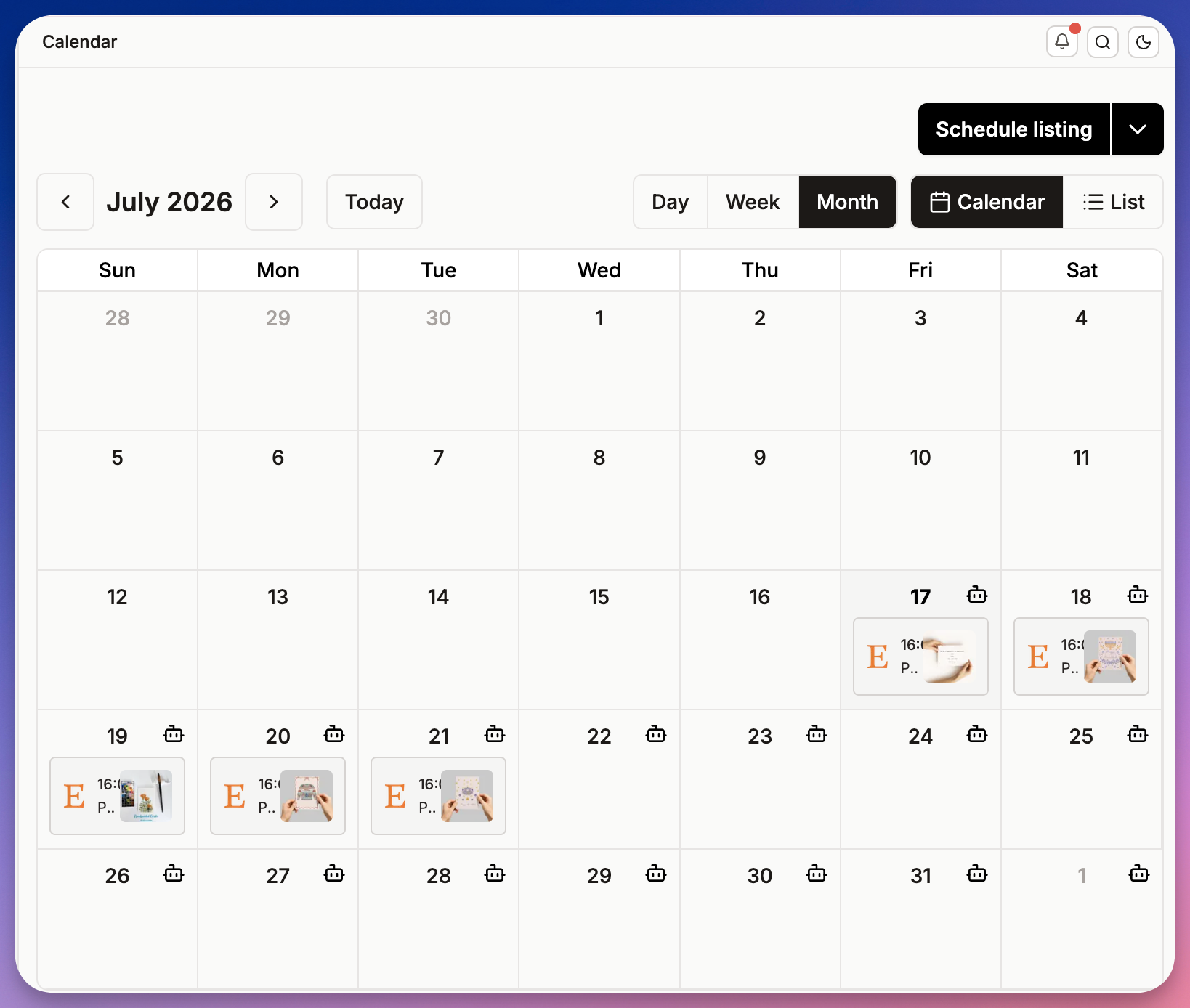
Seasonal listings need time to get found. Launching the week before a holiday is usually too late. The AI can check which seasonal phrases are already warming up, then schedule your drafts in waves.
Copy this:
“Check these holiday phrases in Listadum: [5 to 10 phrases]. Which are rising over the last 7 and 30 days? Then look at my drafts, match each to a phrase, and suggest a publish date at least 4 weeks before its holiday. Show me the plan before you schedule anything.”
What it pulls: short-term trends for each phrase, your drafts, then the publish dates you approve.
Watch out for: unfinished drafts. Only complete drafts can be published or scheduled.
Want a quick read on your catalog first? Run a free Shop Critique to see where your listings stand in a few minutes. No credit card needed.
Going further: your own tools and schedules
Chatting is great for decisions and careful changes. It’s slow when you have 200 new products to get live, or a task you repeat every week. That’s where the Listadum API and scheduled tasks come in.
A quick heads up: the API is for sellers who are comfortable with the basics of Claude Code, or a similar coding tool. You don’t need to be a developer. I describe the tool I want, Claude Code writes it, and I run and test it. But you do need to be OK working with files, a terminal, and an API key. If that’s not you yet, the MCP and scheduled tasks (use case 10) cover most of the same ground with no code.
9. Launch hundreds of listings from a CSV
This is how I launched hundreds of listings. I built my own listing uploader on the API, and it handles both digital and physical products:
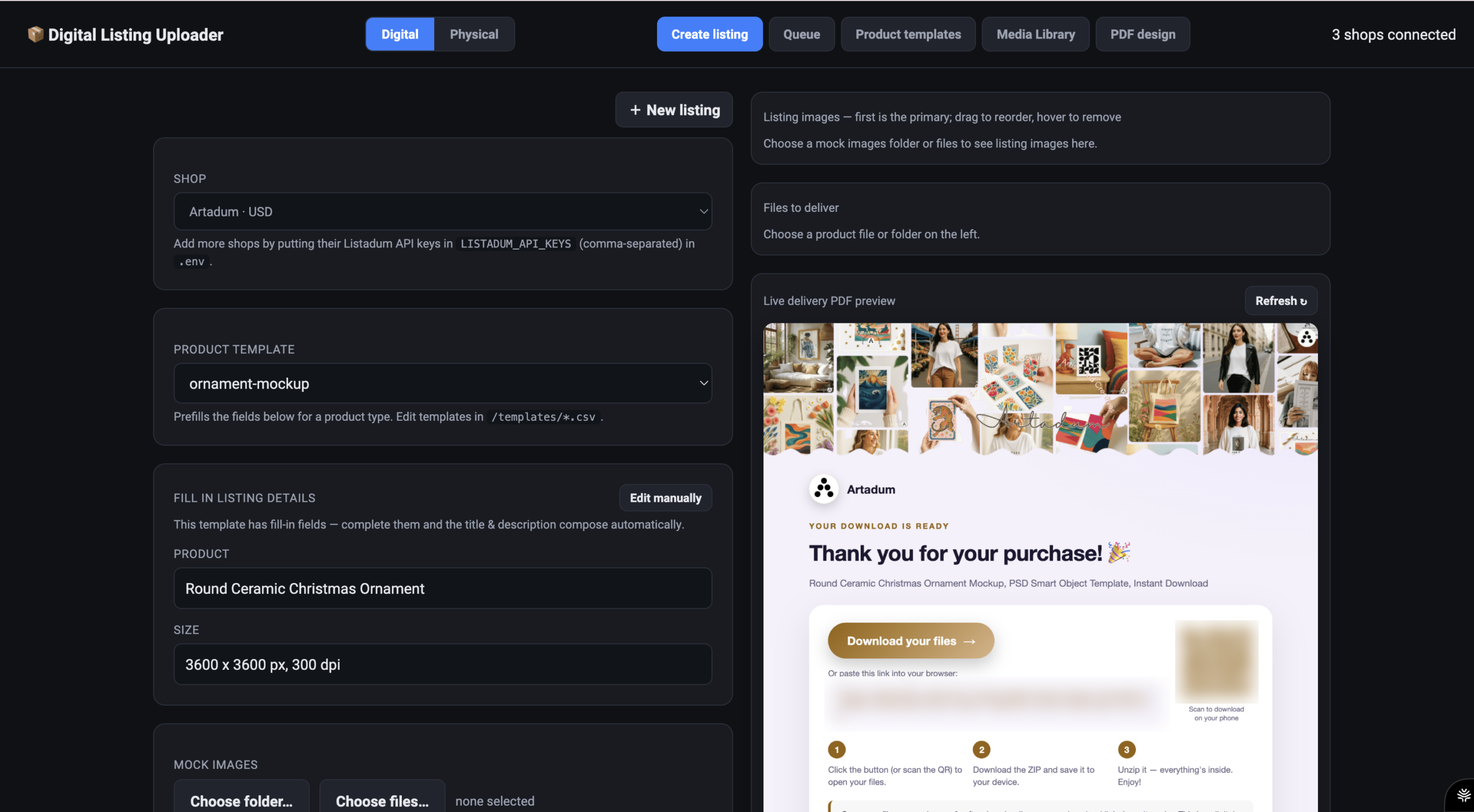
Here’s how it works:
- Product templates live in CSV files. One per product type, like an ornament mockup. Pick the template, fill in a few blanks (product name, size), and the title and description write themselves.
- Mockups and files drop in from a folder. The first image becomes the main photo. For digital products, I point it at the files buyers will download.
- It builds the download PDF for me. Every digital listing gets a branded “thank you” PDF with a download button, a QR code, and three simple steps for the buyer.
- Listings go into a queue. I can line up a whole batch and send it.
- It works across all my shops. Three are connected, and I switch between them from one dropdown.
What used to take a weekend of copy and paste now takes one template and a folder of files. And it pairs perfectly with use case 1: the playbook tells me what to launch, the uploader gets it live.
10. Put the repeat work on a schedule
If you type the same prompt every Monday, you don’t need to. Claude can run it for you on a schedule, using the same Listadum connection. No extra tools, no code.
Just ask Claude to set up a scheduled task, in plain words:
“Every Monday at 8am, check my shop in Listadum: top 5 listings by views and sales this week, any listing whose views dropped a lot, new listing issues, and reviews under 5 stars. Send me a summary with the 3 things I should do this week.”
“On November 1 at 6am, raise prices by 10% on my 20 holiday listings, rounded to .99. Then send me a before and after table of everything that changed.”
A few I’d set up first:
- A Monday check-in across all your shops.
- A pre-holiday price change on a set date, plus a second one to set prices back after the season.
- A weekly niche watch: re-check the keywords from your last playbook and tell you which ones are heating up.
- A monthly prune list: listings with no sales in 180 days, ready for you to review.
Watch out for: letting a schedule make big changes with nobody looking. Start with tasks that only read and report. For tasks that change listings, keep them small, and have the task send you the before and after table every time.
Prefer to build it yourself? The same jobs work with the API too:
- Export your catalog to Google Sheets on a schedule.
- Connect Make or n8n if you already run your business on them.
- Sync stock with your own inventory system, so you never oversell.
- Mix Listadum data with everything else you track. Listadum already gives you one dashboard across all your shops. The API is for the things it doesn’t cover yet, like your bookkeeping, supplier orders, or ad spend from other platforms, all in one view you design.
Use the MCP when you want to think and decide. Use a schedule when the decision is made and the work just needs to happen.
Keep yourself in charge
The AI is the fastest assistant you’ve ever had. It isn’t the one making the final call. These four habits keep it that way:
- Read before you write. Ask it to read the listing first, every time.
- Ask for a before and after table. Never approve a change you haven’t seen.
- Try one listing first. When it looks right, then do the batch.
- Say “don’t change anything yet.” It’s the most useful sentence in this whole post.
MCP or API: which one do you need?
| What you want to know | MCP (chat) | API (your own tools) |
|---|---|---|
| What it is | You talk to your shop in Claude or ChatGPT | Your own tools and scripts talk to Listadum directly |
| Best for | Deciding and making careful changes | Volume, and work you repeat |
| Examples | Niche playbooks, catalog triage, batch refreshes, repricing | Bulk launches from a CSV, Sheets exports, inventory sync |
| New listings | Edits, publishes, and schedules drafts. Can’t create from scratch yet | Yes, with your own uploader |
| What you need | Plain words. No code | The basics of Claude Code. Claude writes the code, you run it and check it |
| Runs without you | Yes, with a scheduled task in Claude | Yes |
| Cost | Same add-on for both: $10/month on Starter or Growth, included on Max | Same add-on |
Most sellers with a big catalog end up using both. The MCP is where I decide what to do. The API is how the big jobs get done.
FAQ
Can ChatGPT connect to my Etsy shop?
Yes. ChatGPT can connect through the Listadum MCP as a custom app in Developer mode. Once it’s approved, it can read your listings, orders, reviews, and keyword data, and make changes you approve.
Does this work with Claude too?
Yes. In Claude you add Listadum as a custom connector with the URL https://mcp.listadum.com. It also works in Claude Code.
Is it free?
The MCP needs a paid Listadum plan with API access. That’s a $10/month add-on on Starter or Growth, and it’s included on Max. Your ChatGPT or Claude plan also needs to support custom connectors or apps, so check their help pages for your plan.
Is it safe to let AI edit my listings?
You approve the connection when you sign in, and you don’t share your Etsy password. For edits, ask the AI to show you a before and after table and approve each change yourself. Start with one listing.
Can it create new Etsy listings?
Not through the chat yet. The MCP can edit existing listings, update variants, and publish or schedule drafts. To create listings in bulk, use the Listadum API with a CSV upload tool, which is how I launch mine.
Can it manage more than one shop?
Yes. If you connect several shops to Listadum, the AI can see all of them in one chat, compare them, and work on any of them.
Can it run on a schedule without me?
Yes, in Claude. Ask it to set up a scheduled task, like a Monday shop check-in or a price change on a set date, and it runs with your Listadum connection at that time. Start with tasks that only read and report.
Should I use ChatGPT or Claude?
Both use the same Listadum tools, so the shop data is identical. Pick the one you already like writing with. If ChatGPT skips the tools, switch it to Thinking mode.
Stop letting your AI guess about your shop.
Connect Claude or ChatGPT to Listadum and every answer comes from your real listings, sales, and Etsy search data. Start with the free plan, then add API access when you’re ready to chat with your shop.
Free plan · no credit card · connect your real Etsy shop in minutes
Neha Chandelier, Co-founder of Listadum, selling on Etsy since 2020. She writes about Etsy tips and tricks, how to sell on Etsy, and growing a handmade shop.