
By Neha Chandelier, co-founder of Listadum. Last updated June 7, 2026.
Part of our Etsy SEO guide. Pairs with Etsy tags and Etsy titles.
Let’s cut through the noise and get to what really matters: getting your beautiful creations in front of the right eyes. If you have been selling on Etsy for any length of time, you know that making amazing products is only half the battle.
The real challenge? Making sure people can actually find them.
That is where Listadum’s Keyword Explorer becomes your secret weapon. This is not just another dashboard of confusing metrics, it is the bridge between your craftsmanship and the customers who are actively searching for exactly what you make.
This guide walks you through how to use it, without the fluff or false promises. Because all the passion in the world will not help if your listings are buried on page 37 of the search results.
Selling on Etsy is not just about making beautiful things and listing them online. There is a whole emotional side to it, and the Keyword Explorer quietly helps with the parts that trip most sellers up:
- That nagging self-doubt (we all get it). When sales are up and down and you start questioning everything, data helps you feel confident about your product decisions instead of guessing.
- Tag overwhelm. You picked your first few tags and have no idea how to fill the remaining slots. The Explorer hands you relevant options, scored.
- A dry creative well. Seeing what people are actually searching can spark your next product when you are out of ideas.
The answer to most of these is the Listadum Keyword Explorer. Let’s dive in.
TL;DR
- The Keyword Explorer scores any phrase on demand and competition, color-coded green to red, so you stop guessing which keywords are worth using.
- Three tabs plus an AI generator: Analyze (research one keyword), Compare (two side by side), Keyword Lists (save and reuse), and the Keyword Generator (describe your product, get scored tag suggestions).
- Two ways in: the left panel for open research, and a listing’s Tags section, where the Keyword Explorer, Keyword Generator, and Keyword Lists are one click away.
- Use it to find a trending niche, build a new listing’s tags, fix a listing that is not getting found, and track a niche over time.
- Verify your main keywords’ real volume in Etsy Marketplace Insights; use Listadum for the multi-year trend and seasonality.
Step-by-step: connect and open the Keyword Explorer
Step 1: Sign up and connect your Etsy shop. Create an account on Listadum with your email, then follow the prompts to link your Etsy shop. This connection is what lets Listadum analyze and optimize your real listings.
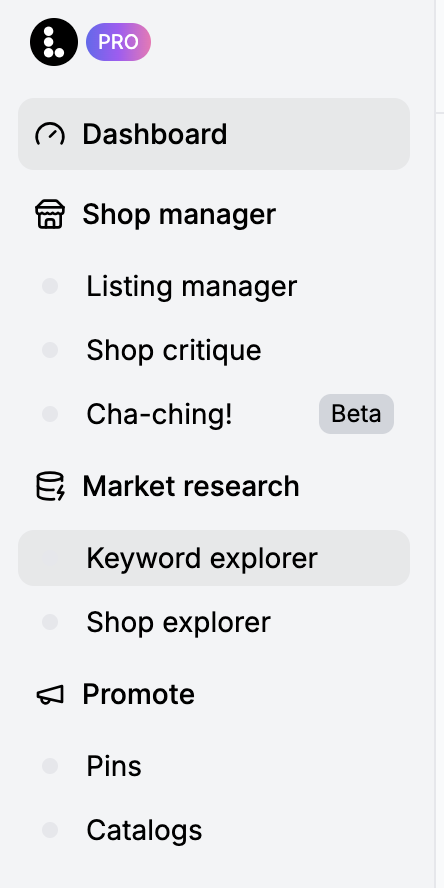
Step 2: Access the Keyword Explorer from the Left panel
Now you are on the Keyword research page:
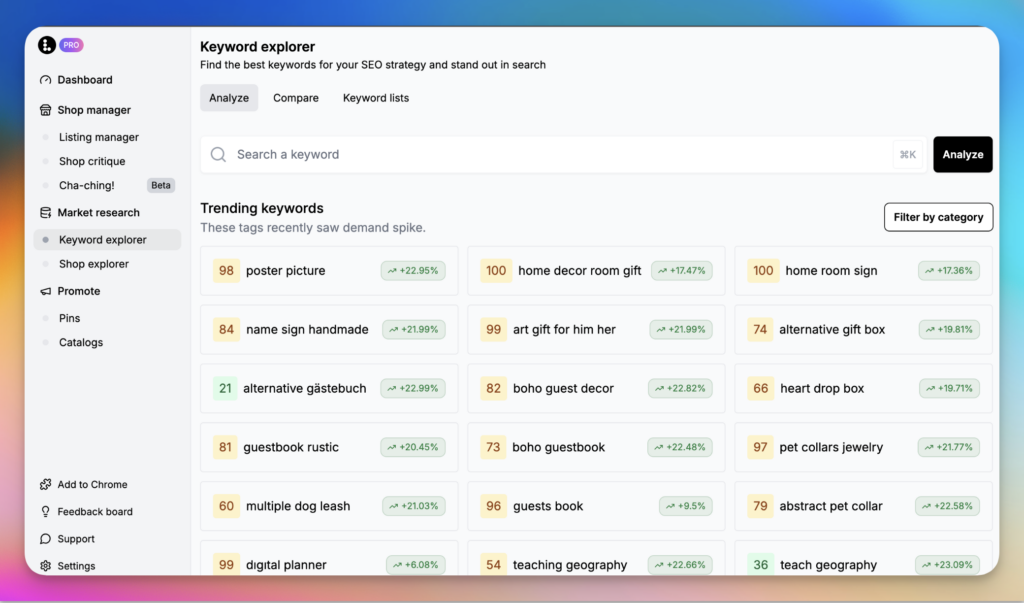
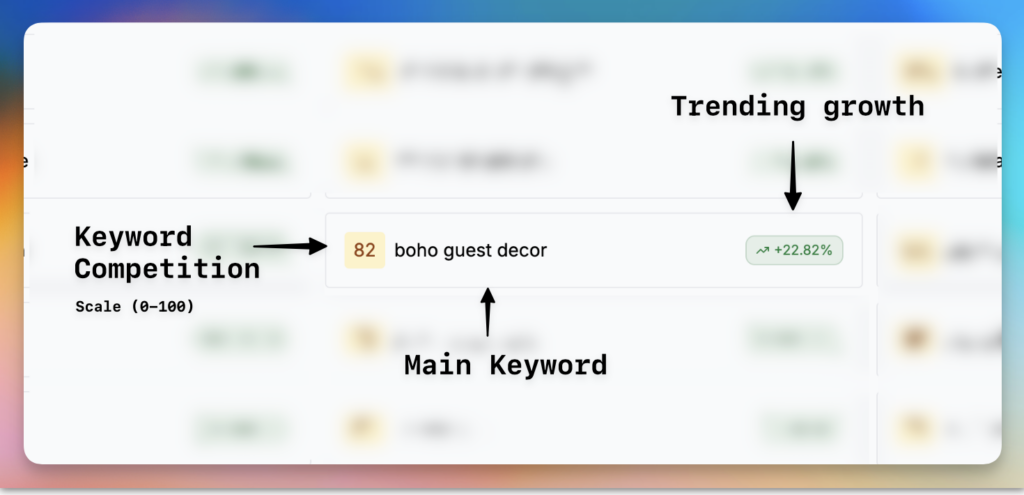
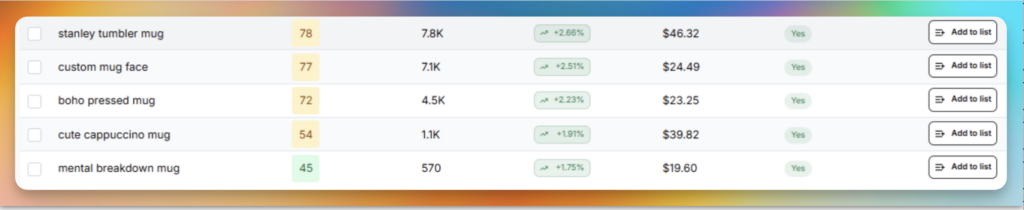
By default it shows a list of trending keywords. Each keyword displays two numbers: the competition on a scale of 0 to 100 on the left, and a percentage growth number on the right. This is a good start for finding interesting trending keywords and products buyers are searching on Etsy. Click any one to get a more detailed view.
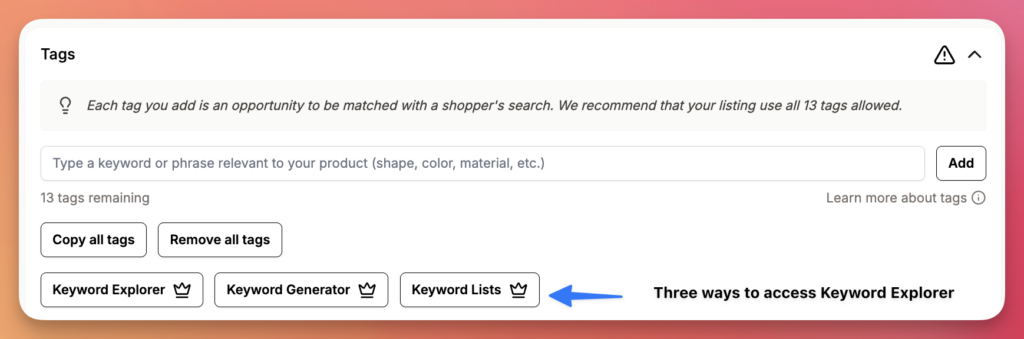
Another way in is through your listing page. From a listing’s Tags section you can open the Keyword Explorer, the Keyword Generator, or your Keyword Lists, so the right keywords are there while you edit. (More on that below.)
Now let’s talk about the three tabs in the top-left corner of the Keyword Explorer: Analyze, Compare, and Keyword Lists.
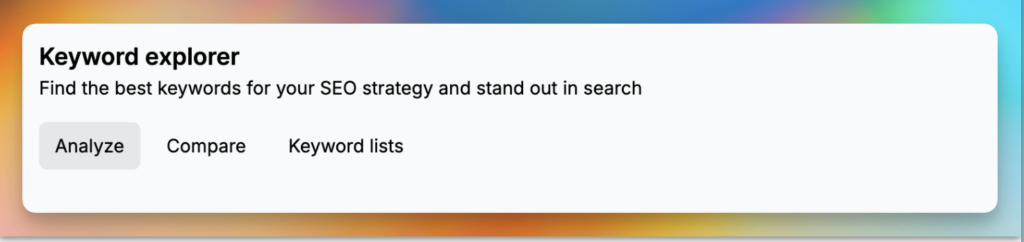
Analyze mode
This is where you start for keyword analysis, market research, or finding new products.
Enter a seed keyword. Type a term that describes your product. For handmade mugs, try “ceramic handmade mug.” The limit here is 20 characters, in line with Etsy’s tag limit.
Your search generates a full analysis of that keyword:
- Number of listings using that keyword (your competition).
- Average number of views per listing.
- Average number of favorites per listing.
- Average price of listings using it.
- A keyword difficulty score based on this data.
- The trend: trending up or down, and by what percent.
- A check for whether the keyword is long-tail.
It also shows three charts that help you read the keyword at a glance:
- Market saturation. Where the keyword sits on the demand-versus-competition chart. Ideally you want green keywords (high demand, low competition) and want to steer away from the deep red. It is not always possible to find green tags for your product, so do your best to diversify across the widest relevant range.
- Demand over time. Whether the keyword is in demand, and whether seasonality affects it. Your goal is a keyword trending upward here.
- Competition over time. The number of listings using the keyword. A good way to spot a niche that is picking up, or one that has already saturated.
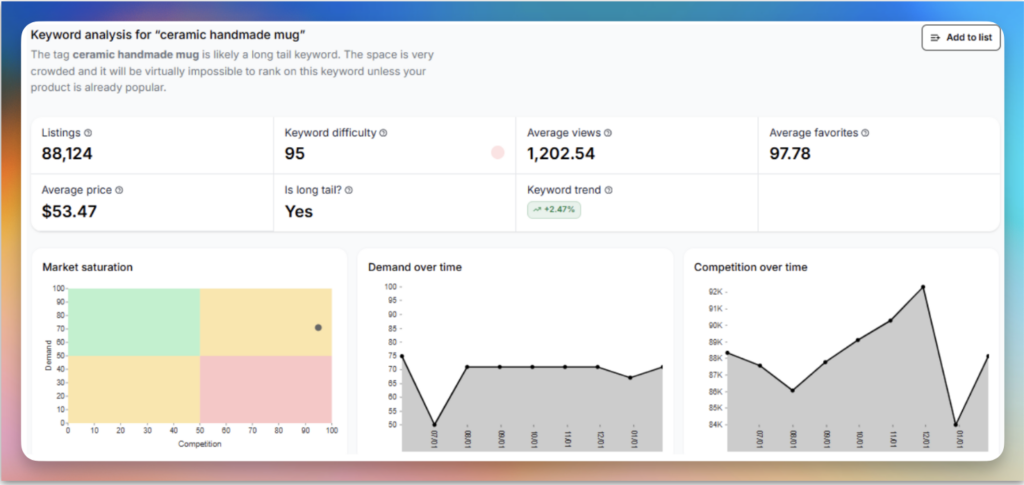
Those three charts combined give you a good idea of whether your selected keyword is worth using.
Linked keywords and related keywords. Along with your selected keyword, Listadum gives you a list of linked keywords (ones that usually occur close to your keyword in real Etsy listings) and related keywords (matches and combinations of your keyword, imagine every possible variation).
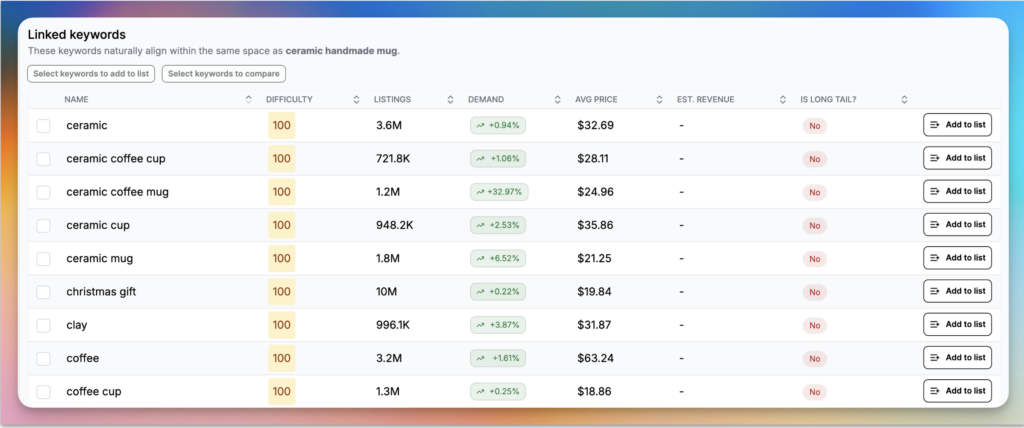
This is a great way to find alternatives to your selected keyword. It also helps you find related products or trending niches, and green tags that describe your product better.
💡 Look for keywords with high search volume and manageable competition in a niche that closely matches yLook for keywords with high demand and manageable competition in a niche that closely matches your existing product. And choose keywords that accurately describe your item, so you attract the right buyer.our existing product.
Top listings. This section shows you all the Etsy listings using the keyword. Sort them by price, views, daily views, favorites, favorite ratio, and listing age. You can see every tag a listing uses, and open it on Etsy with the arrow.
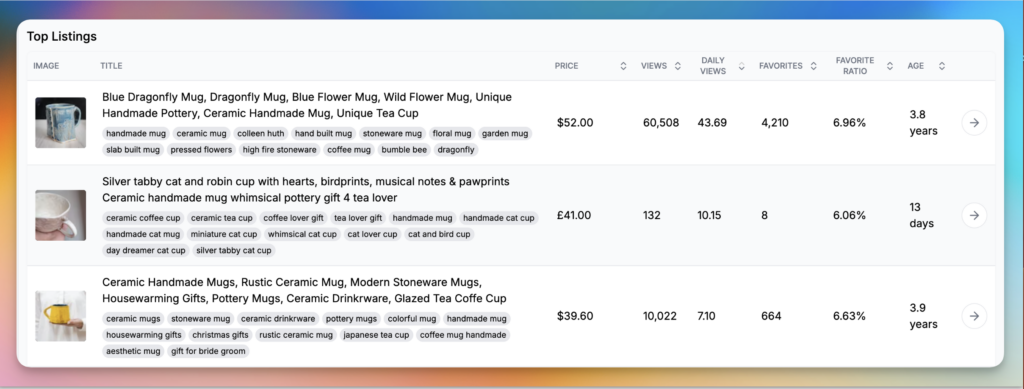
💡 Want to know which listings are killing it in the last couple of months? Sort the top listings by age and favorite ratio. A newer listing with a high favorite ratio means demand is picking up before the competition piles in.
Compare mode
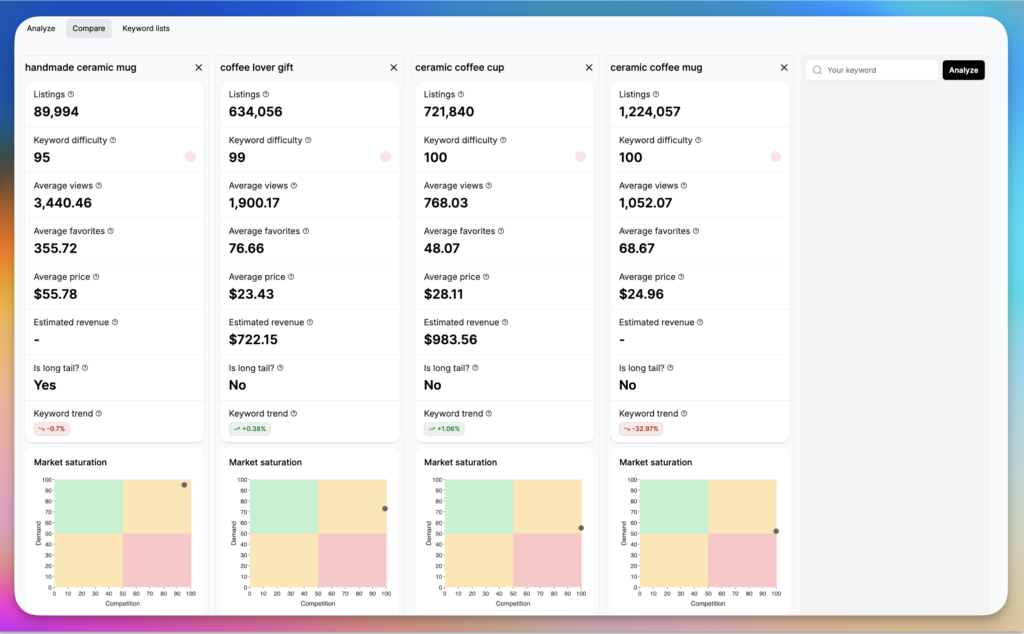
It can be hard to pick between two very similar-looking keywords. Select two or more keywords and Listadum gives you the option to compare them in depth, to see which is the better choice for your listing. A small change in wording can make a big difference in the qualified views you get.
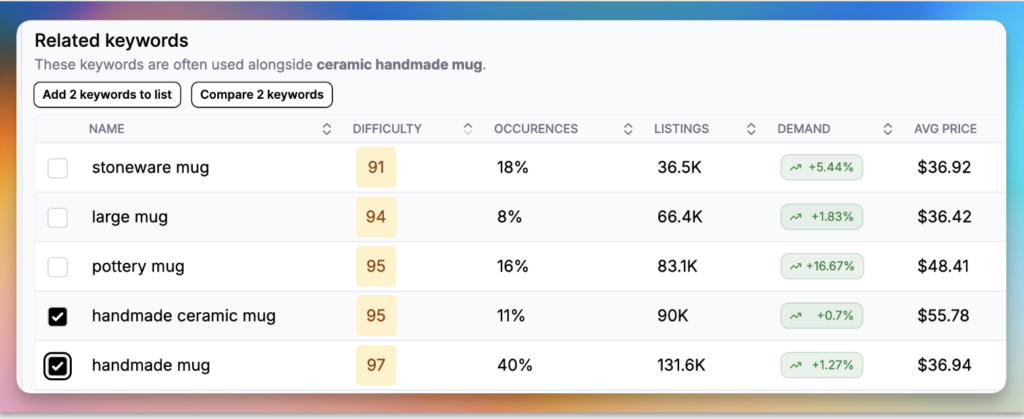
This opens them side by side for an easy comparison. In some cases, “coffee lover gift” might be a better tag than “ceramic coffee mug.”
Keyword Lists
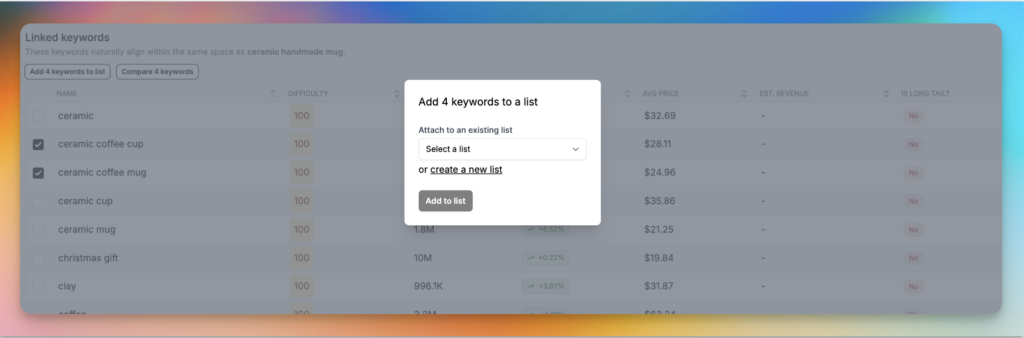
Just like in Compare mode, if you select a set of keywords you can add them to your keyword lists.
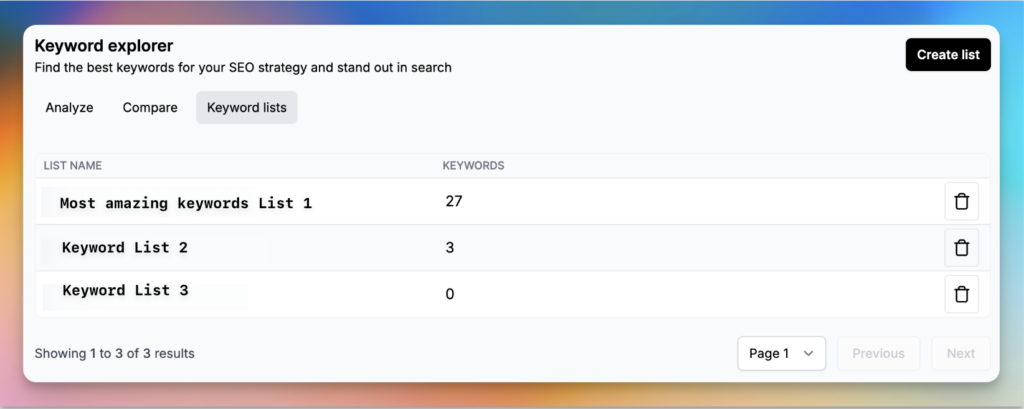
Keyword Lists are extremely useful when you are optimizing listings and want to refer back to a set of keywords you have already researched. Think of it as taking the time to research keywords and keeping a library of useful tags you can pull from any time.
You can also create or access these lists directly from the Keyword Lists tab in the Keyword Explorer.
Generate tags with AI: the Keyword Generator
New since this guide first went out: if you would rather start from a quick description than a blank search box, use the Keyword Generator. It turns a short description of your product into a batch of scored tag ideas.
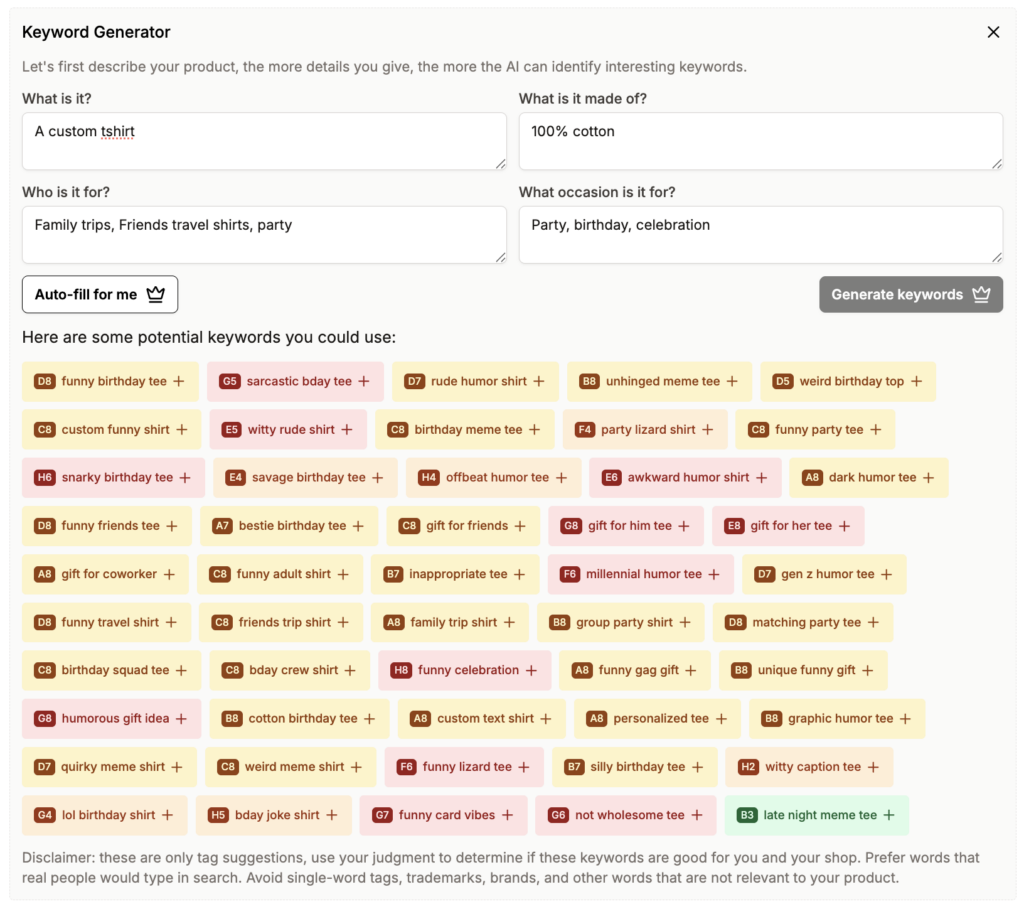
Open the Keyword Generator and answer four short prompts:
- What is it? The item, its colors, what it looks like, any specific details.
- What is it made of? Materials, the process if it matters to the buyer, whether it is handmade or printed.
- Who is it for? The audience, age, interests.
- What occasion is it for? The season, holiday, activity, or whether it is a good gift.
The more detail you give, the better the suggestions. Short on time? Hit “Auto-fill for me.” Then click Generate keywords.
Listadum returns a grid of suggested phrases, each color-coded by demand and competition (the same green-to-red scale as the rest of the Explorer), with a plus to add any of them straight to your tags.
One reminder the tool itself gives you, worth repeating: these are suggestions. Prefer phrases real people would type, keep each tag to 20 characters or fewer, and avoid single-word tags, trademarks, brands, and anything not actually relevant to your product. (More in our guide to writing Etsy tags that get found.)
Free Etsy SEO Guide. Keyword research is one piece of it. Get the whole search picture, titles, tags, descriptions, and photos, in one free guide you can work through listing by listing.
Fix an existing listing that is not getting found
How to find new products or trending niches on Etsy
Analyze mode is a powerful way to find niches that are about to take off, or already picking up. To find a trending niche:
- Type a broad keyword in the search bar.
- Look at the related and linked keywords to spot patterns.
- Open the top listings and sort them by age.
- Look for listings with a very high favorite ratio and a low age. That usually means demand for that product is picking up.
- To find a new product, start with a broad term (for example, “T-shirt”) and repeat the same process.
It takes some time, but this analysis points you in a direction to start.
How to track trending keywords, tags, and niches
The easiest way is to build your own collection of keyword lists. Add keywords as you research, then monitor their performance over time. For example, a list called “contemporary art” could track a niche like “David Hockney art” within that space.
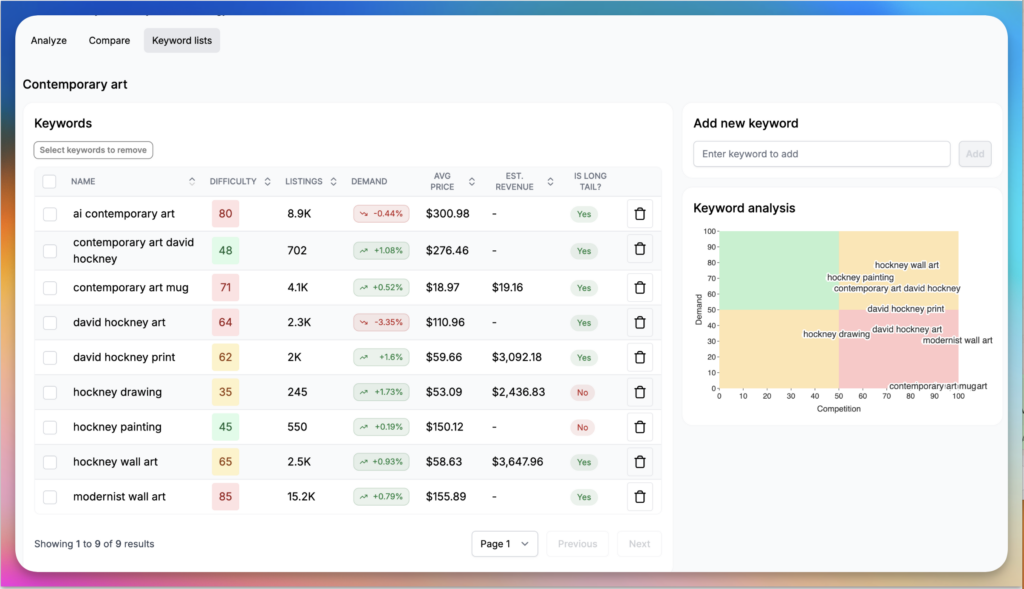
The chart makes it easy to see:
- How good or bad your keywords are (demand versus competition).
- When it is time to change them (they start trending down or slide into the red).
- Which tags are gaining traction in your chosen niche.
Note: sometimes you will see keywords longer than 20 characters. That is because some countries let Etsy allow more than 20 characters to fit their language. If you want to use such a keyword, break it into two keywords. Doing that can also turn the tag green.
How to find the best tags for your listings
This is a combination of understanding how your current tags perform and finding better alternatives that describe your product but are lower competition and higher demand. In the example below, a listing is using a set of super-saturated keywords: a few are yellow, but most fall into the red zone.
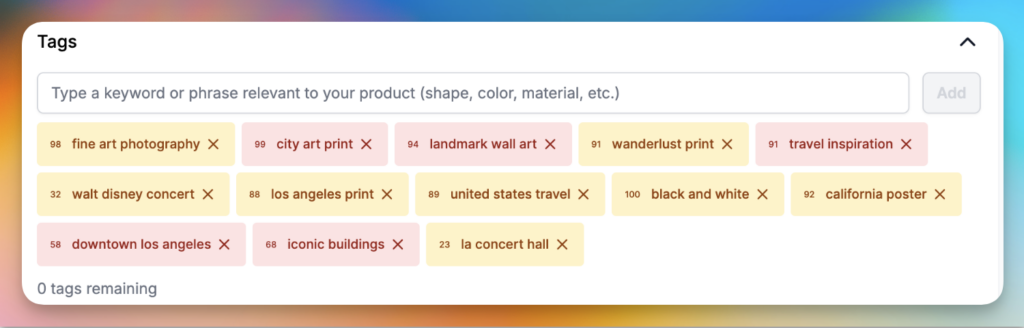
💡 When finding the best tags for your listings, you need a combination of keywords in red, yellow, and green zones. They need to be hyper-relevant to your product and closely match what a potential buyer is searching for.
Two more things that make a real difference:
Verify your main keywords in Etsy’s own data. Etsy’s Marketplace Insights, inside your shop’s search analytics, shows the actual search volume for a term, currently about 30 days of data, with a 12-month window rolling out. It is the most reliable way to confirm real demand on the handful of keywords you build a listing around. Then come back to the Keyword Explorer for the multi-year trend and seasonality a 30-day window cannot show. (It also helps to look at the search terms that led to sales in your Etsy stats.)
Keep each tag to 20 characters or fewer, and do not repeat words. Etsy breaks your tags into individual words and builds its own combinations, so a repeated word is wasted space. Every unique, relevant word widens your reach. (Full tag model: how to write Etsy tags that get found.)
How to optimize your listing tags for SEO
The best way is to do some prior research and save keyword lists. The other way is to work directly from the Tags section of a listing in the Listing Manager, which now puts all the keyword tools one click away.
Open the listing you want to edit and scroll to its Tags section. A few things happen there:
Keyword Lists to pull in a set of keywords you have already saved.
Your tags are color-coded right in the editor. Each tag chip is scored on the same green-to-red demand-and-competition scale, so you can see at a glance which of your current tags are strong (green) and which are saturated (red).
Listadum flags the issues for you. It calls out the common leaks: not enough tags, single-word tags, and repeated words. The repeated-words warning is especially handy: it tells you exactly which words you are reusing and how often (for example, “you are using ‘card’ 6 times, ‘gift’ 3 times”) and nudges you to free up those characters for more specific phrases. That is the tag model in a nutshell, Etsy recombines your words, so repeats are wasted space. (More: how to write Etsy tags that get found.)
Three keyword tools, right there. At the bottom of the Tags section you have three buttons:
Keyword Explorer to research and analyze any phrase, with the demand-and-competition quadrant chart for your current tags.
Keyword Generator for AI tag suggestions from a quick product description.
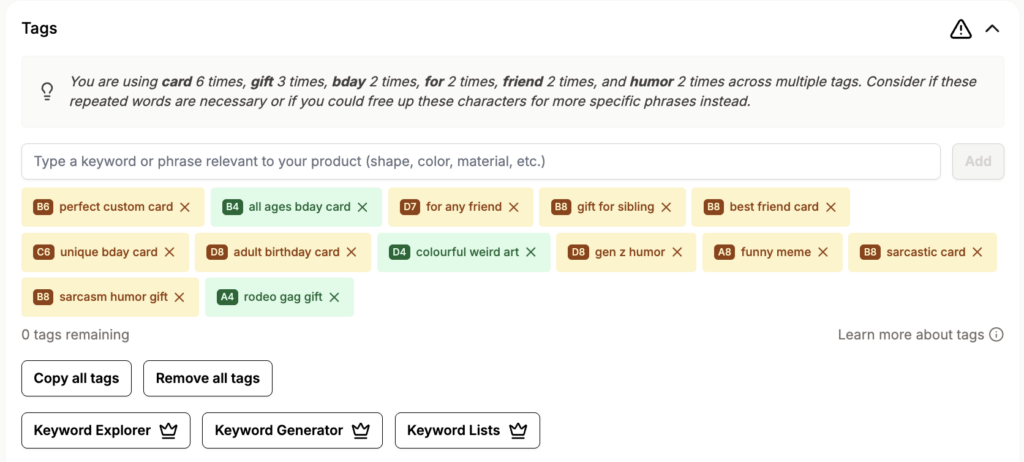
So you can diagnose and fix a listing’s tags without ever leaving it: read the color-coded chips, clear the repeated-word and single-word issues, then open the Explorer, Generator, or a saved List to find better Listadum Tags section with color-coded tags, a repeated-words warning, and the three keyword tool buttons.
So you can diagnose and fix a listing’s tags without ever leaving it: read the color-coded chips, clear the repeated-word and single-word issues, then open the Explorer, Generator, or a saved List to find better replacements. The new keywords you choose should be hyper-relevant to your product and give you a good spread across the top half of the quadrant chart.
Open the Keyword Explorer from there, or click any tag, to bring up its analysis on the right.
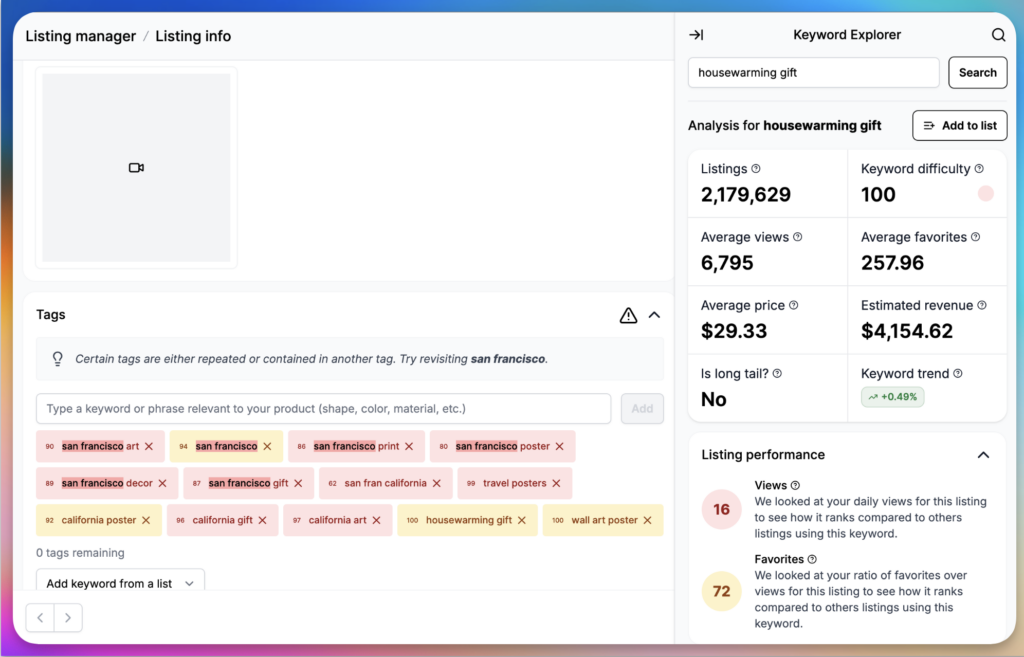
For each keyword you will also see a listing performance score: the views and favorites it could potentially bring you from Etsy. For example, “housewarming gift” might bring few views, but anyone who finds you has a high chance of favoriting your listing.
To replace an existing tag, browse the list of similar, related, or linked keywords. To look for new ones, type a search term in the box at the top-right of the Keyword Explorer and follow the same steps. Hover over any keyword to add or copy it.
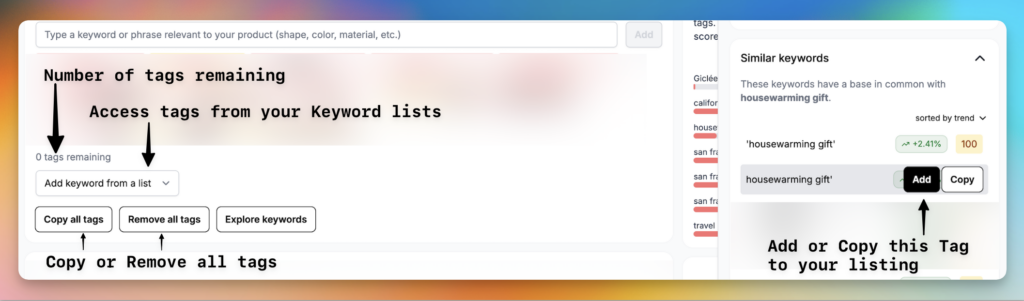
You can also click any tag in the list to analyze it further.
Conclusion
A lot of your shop’s success depends on choosing the right keywords, but it does not have to be overwhelming. Set aside some time to explore new keywords and build a few lists, and you minimize the decision overload when you are creating your stellar listings. You do not have to live with stale keywords just because you do not know where to find the next set.
Hopefully this helped. If you still have questions, reach out in our Discord community, or via chat or email. Listadum is here to help you.
FAQ
How do I use Listadum’s Keyword Explorer?
Open it from the left panel for open research, or from the tags section of a listing to fix that listing. In Analyze mode, type a seed keyword to see its demand, competition, trend, and the three charts, then mine the linked and related keywords, compare close options, and save the winners to a Keyword List.
What is the Keyword Generator?
It is an AI tool that turns a short description of your product into tag ideas. You answer four prompts (what it is, what it is made of, who it is for, what occasion), or hit Auto-fill, and it returns a grid of phrases color-coded by demand and competition, each with a plus to add it straight to your tags.
What are Keyword Lists for?
They let you save and organize your researched keywords into reusable lists by product type, season, or niche. You pull proven tags from a list while editing a listing, and you can track a niche over time by watching the list’s demand-versus-competition chart.
Where can I see real Etsy search volume?
In Etsy’s own Marketplace Insights, inside your shop’s search analytics. It shows actual search volume for a term, currently about 30 days of data, with a 12-month window rolling out. Pair it with Listadum’s demand-over-time chart for the longer trend and seasonality.
Can I use the keyword tools while editing a listing?
Yes. The Tags section of a listing in the Listing Manager has three buttons, Keyword Explorer, Keyword Generator, and Keyword Lists, plus color-coded tags and an issue report that flags repeated words and single-word tags. You can research, generate, and apply tags without leaving the listing.
Is the Keyword Explorer free?
You can connect your Etsy shop to Listadum on the free plan and use the Keyword Explorer on your real listings, no credit card required. It is the fastest way to see how your current keywords score and find better ones.
Reading about it is one thing. Running it on your real listings is another.
Connect your shop to Listadum free and run the Keyword Explorer on the searches that matter to your products.
Open the Keyword Explorer free →
Free plan · no credit card · connect your real Etsy shop in minutes
Related: Finding high-demand, low-competition tags · The Etsy title formula