TL;DR: On May 11, 2026, Etsy expanded personalization from a single text field to up to 5 questions per listing. New question types include dropdown and file upload, which means buyers can now upload photos at checkout (the end of chasing customers in chat for their pet’s reference picture). Listadum supports all of it from day one. I also shipped two new tools, personalization profiles and details profiles, so you can manage these new options across many listings at once instead of one by one. Profiles are part of the Growth plan.
The dance every personalization seller knows
If you sell personalized listings on Etsy, you know the dance.
A customer buys your custom pet portrait. You wait. They don’t send the photo. You message them through Etsy. They reply three days later with a blurry shot of two dogs and no clarification on which one. You message again. The order ships late. Maybe they leave a four-star review because “communication could be better.”
That’s about to end. On May 11, Etsy quietly shipped one of the most important updates personalization sellers have seen in years. We shipped support for it on day one. Here’s what changed and how to actually use it.
What Etsy actually changed
Before last week, an Etsy listing had one personalization field. One text box for the buyer to type whatever you asked them for. Names, dates, photo references, custom requests, all of it. One field. Everything they had to communicate either fit into that box or ended up in Etsy chat after the order was placed.
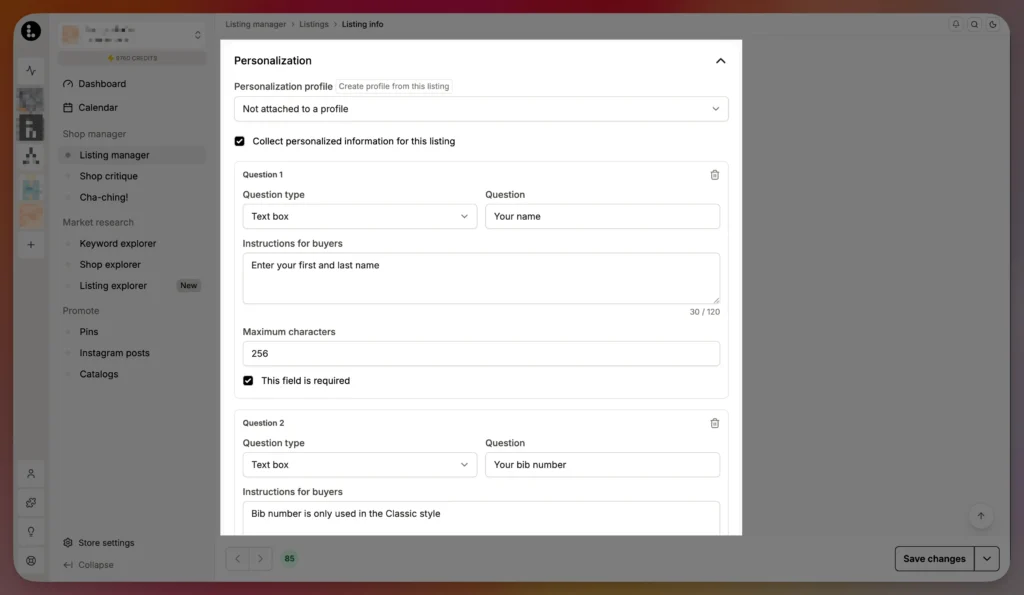
Now you get up to five questions per listing. Each question can be one of four types.
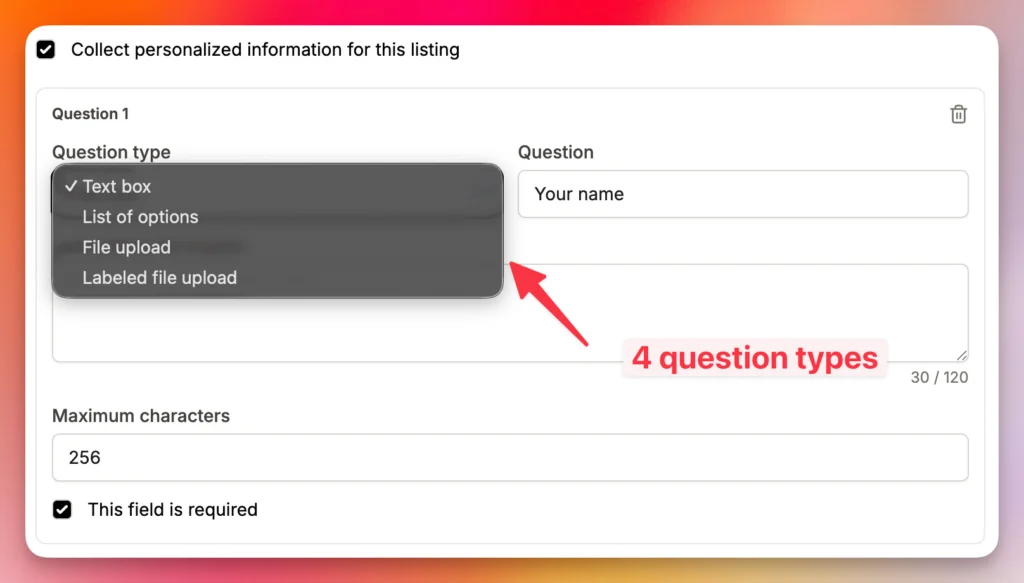
Open text. What we had before, but tighter: 120 characters per question, down from the much longer single field. Etsy is clearly nudging sellers to break a request into multiple focused questions instead of jamming everything into one prompt. In practice, this is a good thing. Clearer asks get clearer answers.
Dropdown. A predefined list of options the buyer picks from. Great for color, font, size, or any variant that isn’t a true product variant. Saves you from typo-cleaning buyer free-text and the surprises that come at fulfillment time.
Labeled and Unlabelled File upload. Buyers can upload images at checkout. Two flavors: either up to 10 photos unlabeled (good for “send me reference shots”), or labeled file uploads (good for “upload the dog photo here, the family photo there, the inspiration board over there”). This is the showstopper. For anyone selling custom portraits, photo-based prints, monogrammed items with reference images, or anything else where you need a customer asset to fulfill the order, the chase-them-in-chat workflow is gone. They give you what you need at the moment they pay.
You can also mark each question as required or optional. Required means the buyer can’t complete checkout without answering, which is the right call for the photo upload on a custom portrait. Optional is fine for a “any special requests?” open-text question.
Why this is bigger than a feature
Most Etsy sellers don’t use personalization. That’s the thing worth saying out loud.
Personalization is one of the strongest differentiators a small shop has on Etsy. It’s how you stand apart from the mass-market base item your competitor is selling cheaper. It’s how you raise margins, since personalized items have higher perceived value and typically sell at higher prices. And it’s how you build a relationship with the buyer that survives the platform.
The old personalization workflow was painful enough that many sellers either avoided offering it at all, or offered it grudgingly and absorbed the operational burden. With five questions and proper file uploads, that math shifts. The friction that kept sellers out of the personalization game just dropped meaningfully.
Worth naming: other platforms have had richer personalization for a while. One of our customers, Nick, wrote about expanding his personalized wedding shop from Etsy to Amazon and called out Amazon’s stronger personalization tooling as one of the things that made the move feel like an upgrade. Etsy catching up here is overdue, and a real win for sellers who want to keep growing on Etsy without compromising the customer experience.
If you’ve been on the fence: now’s the moment to test it on one or two listings and see what happens.
What we shipped in Listadum
Two new things, both built on the same idea: stop reconfiguring the same content across dozens of listings.
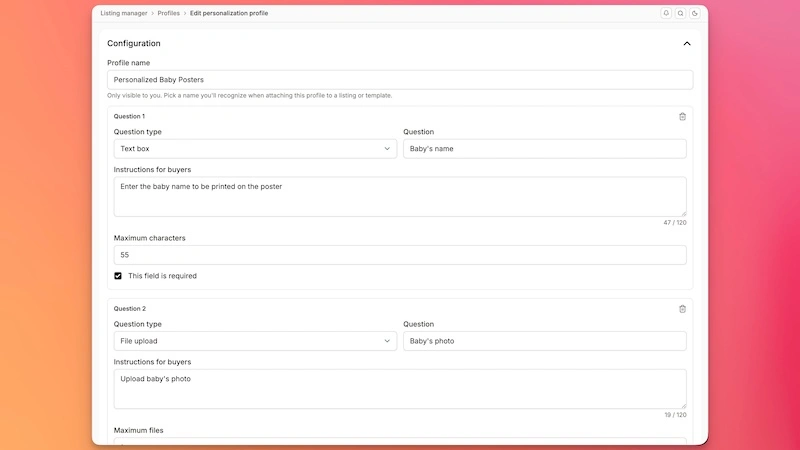
Personalization profiles
A personalization profile is a reusable set of personalization questions. Build it once, attach it to as many listings as you want.
Selling custom name necklaces across 30 listings, all with the same “what name, what font, what chain length” questions? Build that profile once. Attach it to all 30 listings. When you decide to add a fourth question (a color choice, a delivery date, anything), you change it in the profile and every listing using that profile updates automatically.
Details profiles
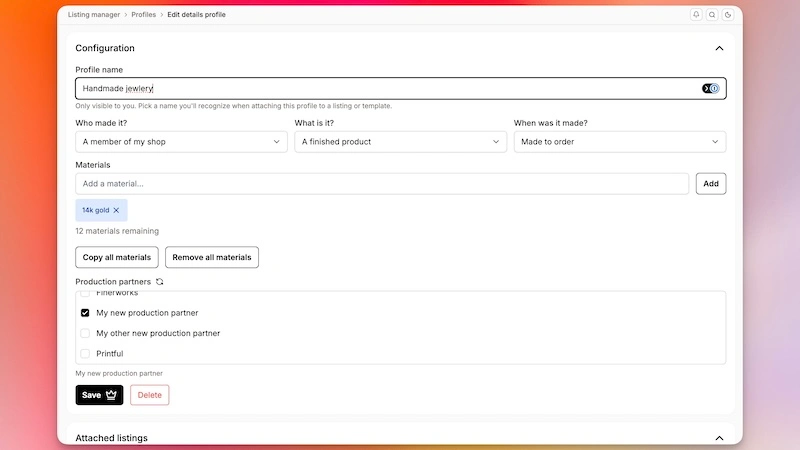
Same idea, applied to the core listing details: who made it, what it is, when it was made, materials, production partners, the whole “Item Details” block Etsy asks for.
If you have 200 listings that all share the same details (“I made it, finished product, made in 2026, materials: 100% cotton”), there’s no reason to be typing that into 200 separate listing forms. Build the profile once. Attach it at listing creation, or via bulk edit to existing listings. Update it in one place when your details change (new material supplier, updated processing time, anything) and every attached listing updates.
Why both of these matter together
This is a step toward making listings composable. Instead of a listing being a monolithic chunk of fields you have to edit as a unit, your listing becomes an assembly of small reusable pieces: variation profiles, personalization profiles, details profiles, template content. Change a piece, and every listing using that piece updates with it.
Less duplicate work. Fewer mistakes. Faster iteration when Etsy changes something, or when your business does. This is the direction I want Listadum to keep heading in.
A note on availability: both profile types are part of the Listadum Growth plan. The new Etsy personalization options themselves are available on every Listadum plan, since they’re Etsy’s feature; our job is to make them easy to set up.
How to start today
If you’re already on Listadum. The new Etsy personalization options are live in your listing editor and bulk edit flows. The two new profile types are in your shop settings (Growth plan). Take ten minutes to set up your first personalization profile, attach it to a few listings, and see what it does to your workflow.
If you’re not on Listadum yet. Start with the free plan, or jump straight to the Growth plan to try profiles. Either way, the bigger move I’d push you on is to actually use personalization on more of your shop. The friction just dropped. The differentiation is still there.
Frequently Asked Questions
What changed with Etsy personalization on May 11, 2026?
Etsy expanded personalization from a single text field to up to 5 questions per listing. Each question can be open text (120-character limit), a dropdown of options, or a file upload (up to 10 photos unlabeled, or labeled file uploads). Each question can be marked required or optional.
Can buyers upload photos at checkout on Etsy now?
Yes. File upload is one of the new question types. You can ask for up to 10 unlabeled photos, or set up labeled file uploads where each photo has a specific purpose (like “the pet photo” or “the family photo”). Buyers upload at purchase, not after.
What’s the character limit for personalization questions?
120 characters per question for open-text questions. That’s shorter than the old single field, but you now get up to 5 questions per listing, which encourages clearer, more focused asks.
Do I have to use the new personalization options, or can I keep my existing setup?
Existing personalization continues to work. The new options are additive. You can migrate to the new format whenever you’re ready, listing by listing or in bulk.
Are personalization profiles and details profiles free, or do I need a paid plan?
Both are part of the Listadum Growth plan. The free plan doesn’t include them.
Does this work with Listadum’s bulk edit?
Yes. You can attach personalization profiles and details profiles to many listings at once using bulk edit, and the new Etsy personalization options are also available in the bulk create flow.
Want your personalized listings found and converting?
Listadum scores every listing and suggests what to improve first, ranked by impact.
Start free · no credit card · connect your real Etsy shop in minutes