


TL;DR
The Listadum Chrome extension just got a big update. You can now analyze a full page of Etsy search results in one click: aggregate stats across every listing on the page, plus age distribution, price distribution, and the 50 most used tags.
There’s also a one click toggle to see the real bestseller list in any search, and the extension now connects to your Listadum account, so you can track a shop or add listings to your idea boards without leaving Etsy.
The extension is free and works with no account. Tracking shops and idea boards need a Listadum account on the Starter plan or above.
The way most people size up a niche is slow
Here’s how niche research usually goes. You search a keyword on Etsy, you see a wall of results, and to actually understand what you’re looking at you start opening listings. One tab, then another, then another. You eyeball the prices. You check how old each shop looks. You try to guess whether the top results are established sellers or something that popped up last month. Twenty tabs later you have a fuzzy feel for the niche and no real numbers.
That whole routine is now one click. The new Listadum extension reads the entire page of search results for you and hands back the numbers you were trying to assemble by hand. It’s free, and you don’t need a Listadum account to use it.
One click, the whole page analyzed
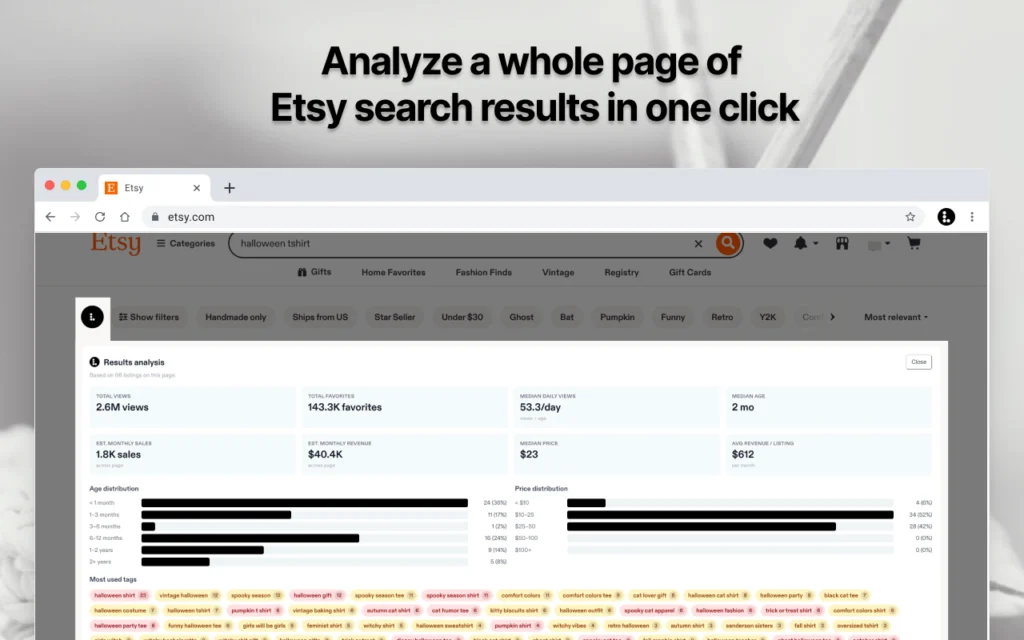
Run a search on Etsy, click the extension, and you get a Results analysis panel built from every listing on the page.
At the top: total views and total favorites across the page, estimated monthly sales and revenue, the median price, the median listing age, median daily views, and average revenue per listing. Under that, two distributions. Age distribution shows you how much of the first page is brand new versus years old. Price distribution shows you where the money actually clusters, not just the cheapest and most expensive outliers. And at the bottom, the 50 most used tags across the page, so you can see the exact language the winning listings are built on.
Here’s a real example. A search for “halloween tshirt” analyzes 66 listings: 2.6M total views, 143.3K favorites, an estimated 1.8K sales a month worth roughly $40.4K, a $23 median price, and a 2 month median age. The age distribution shows 36% of the first page is under a month old, which tells you this is a niche where new listings can still break through. That’s a completely different read than “looks competitive,” and you got it in one click.
One click to the real bestsellers
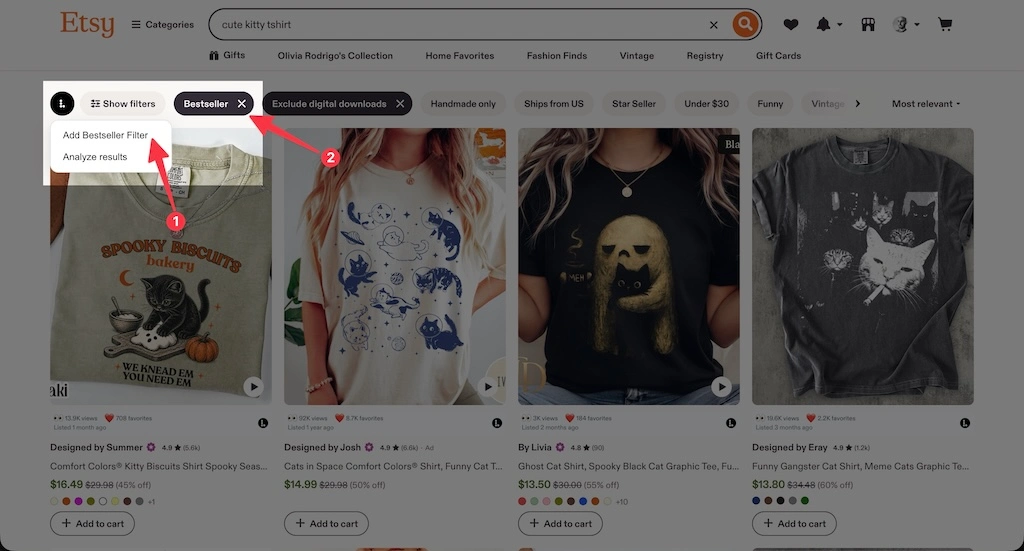
Etsy quietly keeps a bestseller filter, but it’s a pain to reach. The old trick was to filter for Star Seller first, then go into the URL and hand edit is_star_seller to is_best_seller. Fine if you knew the hack, annoying every single time.
Now it’s a button. One click adds is_best_seller=true to your search and shows you the listings Etsy itself considers the bestsellers for that query. When you want to see what’s actually selling in a niche, not just what ranks, that’s the fastest way to get there.
Now it talks to your Listadum account
The extension used to be a research tool that lived on its own. Now it’s connected to your Listadum account, so the things you spot while browsing Etsy go straight into your workflow.
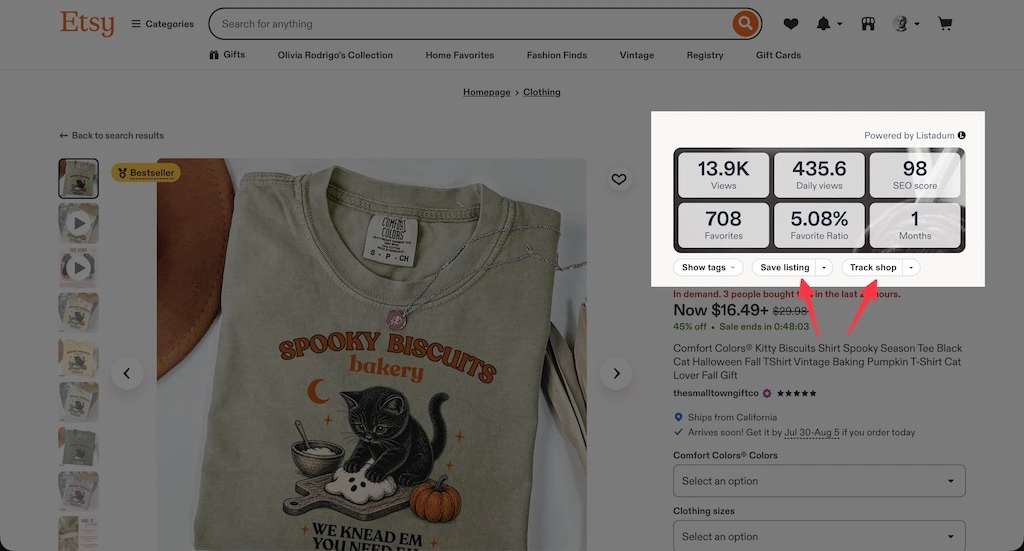
See a shop worth watching? Track it in one click, right from the search page, and it shows up in Listadum for you to follow over time. Untracking is one click too. Find a listing worth saving as inspiration or a swipe file for a future product? Add it to one of your idea boards without leaving Etsy, no copying URLs into a spreadsheet.
These two actions need a Listadum account on the Starter plan or above, since they write to your account. The page analysis and the bestseller toggle don’t. You can do all the research with no account at all, and the account connection is there when you want to act on what you find.
Why this is bigger than a browser extension
Research is only useful if you actually do it, and the reason most sellers skip it is friction. Opening twenty tabs to guess at a niche is the kind of task you talk yourself out of. When the answer is one click away, on the page you’re already looking at, you start doing it constantly. Before you list a new product, before you set a price, before you write your tags, you check what the page actually looks like.
That’s the point. Good decisions on Etsy come from looking at real data instead of guessing, and the extension puts that data where you already are. It’s also the easiest way to try Listadum: it’s free, it needs no account, and it’s genuinely useful on its own. If it earns a place in your routine, the rest of Listadum is right there when you’re ready for it.
How to get it
Install the extension here: https://link.listadum.com/chrome-extension
If you already use Listadum, connect your account so tracking shops and saving to idea boards work from the search page (those two need Starter or above). Then run your next niche search and hit analyze.
If you’re new, just install it and try the page analysis on any search you care about. No account, no trial, nothing to set up. See what a niche actually looks like, then decide what to do with it.
FAQ
Is the Listadum Chrome extension free?
Yes. The extension is free to install and use, and you don’t need a Listadum account for the page analysis or the bestseller toggle. Tracking a shop and adding listings to idea boards require a Listadum account on the Starter plan or above, because those actions save to your account.
What does the page analysis actually show?
For a full page of Etsy search results it shows aggregate stats across every listing (total views and favorites, estimated monthly sales and revenue, median price, median age, median daily views, average revenue per listing), an age distribution, a price distribution, and the 50 most used tags on the page.
Do I need a Listadum account to analyze search results?
No. The page analysis works with no account. The account connection only matters for the two actions that write to your Listadum account: tracking shops and adding listings to idea boards.
How do I see Etsy’s bestseller listings for a search?
Click the bestseller toggle in the extension. It adds is_best_seller=true to your current search and shows the listings Etsy considers the bestsellers for that query. It replaces the old workaround of filtering for Star Seller and manually editing the URL.
Are the sales and revenue numbers exact?
No, they’re estimates. Etsy doesn’t publish exact sales figures, so the numbers are estimated from public signals like listing age and views. Treat them as a way to compare niches and gauge scale, not as someone’s real accounting.
How is this different from opening each listing myself?
It’s the same information you’d gather by hand, without the tabs. Instead of opening listings one by one to eyeball prices and ages, you get the whole page summarized in one click, plus distributions and tag data you can’t easily assemble manually.
What are idea boards?
Idea boards are collections inside Listadum where you save listings worth remembering: competitor products, inspiration, ideas for your next launch. The extension lets you add a listing to a board straight from Etsy search, so you don’t lose the good ones.
Reading the search page by eye only gets you so far.
The Listadum extension scores a full page of Etsy results in one click, so you can see who’s really ranking and what it takes to join them.
Free Chrome extension · installs in seconds · works right on Etsy search