
Last updated: August 25, 2026 · By Cyril Chandelier, Co-founder of Listadum
TL;DR
- AI Photo Studio is live on Growth and Max, and on the legacy Pro plan if you are still on one.
- It generates a full set of listing images from the listing you already have, reading your existing photos, your raw uploads, your title, tags, description, and your brand settings.
- You pick the image types first, from the concepts in our listing image playbook, then answer a short interview so the AI fills in what it could not work out on its own.
- Nothing publishes on its own. You review the generated set side by side with your current images and add all, some, or none.
- Give every image a look before it goes live, the same way you would check a photo you shot yourself.
AI Photo Studio has been sitting in our roadmap for a long time, and a lot of you have asked about it. It is live now on Growth, Max and legacy Pro. I will explain further down what took us so long, because it is the same reason I am happy to put it in your hands today.
First, why we built it at all.
Open one of your listings and look at the photo strip. If you sell a rug, I would bet on five or six photos of that rug on a floor, shot from slightly different angles, maybe one with a hand in the frame. If you sell prints, five mockups. If you sell jewelry, five macro shots on the same linen background.
The camera moved. The job never changed.
Etsy gives you twenty photo slots and two videos. Most shops use five, and all five answer the same question.
Why this happens, and why it is not your fault
Tags and titles have a score attached. You can see the number go up. Photos have no score, so they get uploaded in whatever order they came off the camera and never touched again. That is not laziness, that is a perfectly rational response to the only feedback Etsy gives you.
Then there is the cost. Doing this properly means a shoot, a light, a free afternoon, and something like a photographer’s eye. For one listing that is a big ask. For four hundred it is not a real option, and everybody knows it, which is why the advice to “improve your photos” lands as useless.
So here is what I hear from sellers, over and over.
- “I did the SEO and nothing happened.” Tags get you onto the shelf. Photos are what sell you off the shelf, and Etsy ranks on what sells.
- “People favorite it and never buy.” That is the clearest signal there is. They already liked it enough to save it. Something in the gallery failed to close.
- “I keep getting the same question in messages.” Every message about size, material, or what is included is one buyer who bothered to ask. The rest just left.
- “I get returns because people did not read the size.” They will not dig through a description for measurements. They never have.
- “I am not a photographer.” You do not need to be. Most of the missing images are not photographs at all.
And a word for the person on the other side, because it is easy to get annoyed at them. The buyer is not being difficult. They are on a phone, in a grid of fifty alternatives, giving your listing a few seconds. They are not skipping your description out of laziness. Nobody reads it. They scroll your images, form a picture, and either trust it or leave.
Every unanswered question is a reason to leave. That is the whole funnel.
What images do you actually need
Ten jobs. Each one is a question a buyer is silently asking, in roughly the order they ask it.
- Hero. What even is this? The thumbnail, competing at about 75 pixels against fifty alternatives. Shrink yours and ask a stranger what it is. If the answer is “a white frame in a room” rather than “a folk-art tree print”, it is failing however good the photograph is.
- In a room. How would this look in my life? Worn, held, or in a real space. This is the most over-served slot on Etsy, so shoot it once well rather than six times.
- Why it is good. Why this one and not the twelve others? A calm panel naming three to five things that make it different. Not a list of rules. Defensive copy in an early slot costs more sales than the messages it prevents.
- Detail and texture. Is it worth what you are charging? If you say archival paper, hand-painted, or solid brass and never show the surface up close, the claim is doing no work. Worth two or three slots on anything handmade.
- Size and scale. How big is it actually? Against something familiar, or a dimensions graphic with type you can read on a phone. A multi-column measurement table is the most common unreadable image on Etsy: correct information, zero legibility.
- How it is made. Did a person actually make this? Hands, workspace, work in progress. The most Etsy-native slot there is, and the one sellers skip because it feels self-indulgent. It is your entire differentiator against a dropshipper in the same search.
- What arrives. What actually lands on my doorstep? Packaging, what is included, what is not. For a digital product this is the highest-value missing image there is: how many files, what formats, how fast, and that nothing physical ships.
- Who made it. Who am I buying from? A face or a workspace and a sentence or two. A logo is not a brand story.
- Reviews. Has anyone else risked this? Real words from real customers. Buyer photos beat studio photos for trust.
- Variations. Can I get it in the other color? One image showing the range at a glance, not the same mockup repeated once per colorway.
Ten jobs, twenty slots. The extra ten go to doing the hard jobs more than once, not to more of the easy one.
We wrote this up properly in the Etsy listing image playbook, and if you want the version with examples, these listing image types will take your shop from crickets to consistent sales walks through each one. The thumbnail deserves its own attention too, which is why we covered how to create Etsy listing thumbnails that always work separately.
Not sure which of your listings has the problem? Run a free Listing Critique and start with the one it flags hardest.
Knowing all this has never been the hard part. Producing the missing images, on brand, without a photographer or a studio afternoon, is the hard part. That is the gap we built for.
What this looks like on a real listing
Here is an example for rug listing before and after.
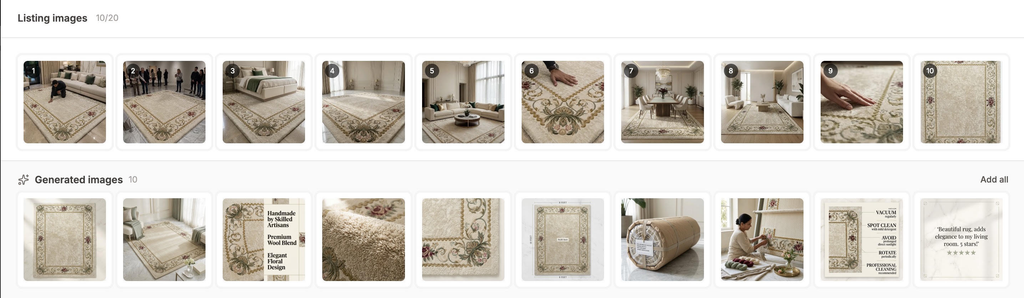
The top row is what the shop had: photographs of one rug, on floors, in rooms, a hand smoothing the pile. Every slot doing the same job.
The bottom row is what Studio generated: a clean primary shot, a lifestyle scene, a benefits panel naming the wool blend and the handmade construction, a texture close-up you can almost feel, a dimensions diagram, the rolled rug as it ships, someone actually making it, and a care card.
Same rug. Same shop. Ten jobs now covered instead of one.
How AI Photo Studio works
You open it from the images section of the listing editor. Four steps.
Here is the whole thing running on a real listing, start to finish.
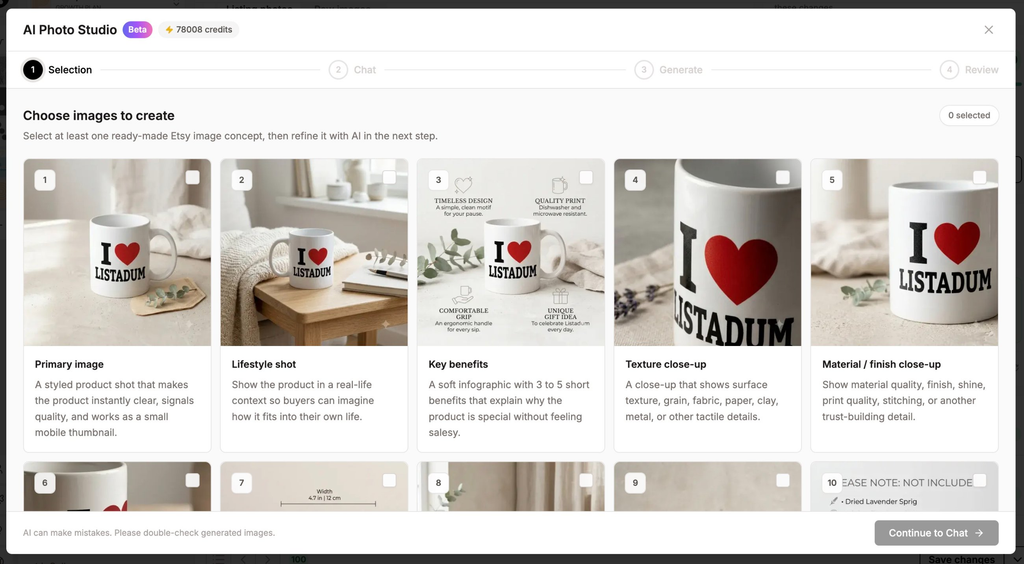
1. Pick what you want
You choose the image concepts to generate, straight from the playbook: primary image, lifestyle shot, key benefits, texture close-up, material and finish, dimensions, and more. Pick one or pick eight.
2. Answer a few questions
Then you talk to the AI. It already knows a lot: your existing listing images, any raw product photos you uploaded for that listing, your title, description and tags, and your brand settings. The interview exists to fill the gaps, the things it could not work out or got wrong. It is short, and it is the step that decides whether the output is any good.
3. It builds a plan, then generates
The AI writes a plan for the set, then generates. A few seconds per image. If one misses, redo it or tweak the prompt and run it again.
4. Review before anything goes live
You see the generated set next to your current images and decide what earns a slot. All of them, three of them, none of them. Nothing publishes without you. Anything you skip sits in your media library for 30 days, so changing your mind later costs nothing.
What took us so long, and what still needs work
The thing that held this back was consistency. Early on, images in one listing did not look like they belonged to the same product, and listings across a shop did not look like they came from the same shop. We were not going to ship that.
Brand settings plus a lot of work on the prompts fixed it. Images in a listing hang together now, and a shop looks like a shop. We will keep improving it, and here is the one thing worth knowing before you start.
AI makes mistakes, so check the product in the image is still your product. A generated image can quietly change a handle, a stitch, a finish, or a color. Give each one a proper look before it goes live, the same way you would check a photo you shot yourself, and redo the ones that drift.
Same goes for any image carrying a claim. A review card needs a real review someone actually left you, and a dimensions diagram needs your real measurements.
And since these are AI-assisted images going onto a live listing, it is worth reading where the line sits on telling buyers. We covered that in should you disclose mockups and AI images in your Etsy listings.
We sat on this feature for a long time waiting for it to be perfect. At some point that stopped being craft and started being an excuse, so we shipped it. It is genuinely useful now, and it will get better.
Where to start
Not your whole shop. Your credits will not stretch that far, so spend them where they move money.
Start with one listing that gets traffic and does not convert. You already know which one. Give it a proper set of images, leave everything else alone, and watch that listing for a few weeks. If the images were the problem, that is where you will see it first.
Then do your next best seller. Then the one after that.
Your listings get the views. The images decide whether anyone buys.
AI Photo Studio is live now on Growth and Max, and on the legacy Pro plan if you are still on one. Every plan includes the listing editor, bulk tools, and keyword research to go with it.
Free plan · no credit card · connect your real Etsy shop in minutes
Cyril
FAQ
Which Listadum plans include AI Photo Studio?
Growth and Max, plus the legacy Pro plan if you are still on one. Credits are shared across all the AI features, so image generation draws from the same pool as the text tools.
How many credits does a set of images cost?
Every generated image is 40 credits, and a redo costs the same 40. A listing where you generate six concepts and redo a couple lands somewhere around 200 to 250 credits.
Do the generated images go straight onto my Etsy listing?
No. You review the generated set against your current images and choose which ones to add. If you add nothing, nothing changes. Images you skip stay in your media library for 30 days.
Do I need to upload my own product photos first?
You do not have to, Studio works from your existing listing images, title, description and tags. That said, uploading clean raw photos of the product gives the AI a much better anchor and noticeably better output, so it is worth doing for listings that matter.
How many images can I put on an Etsy listing?
Twenty photos and two videos of 5 to 15 seconds. The limit went up from ten in 2025, so a lot of published advice still says ten. Most shops use five.
Will the images match the rest of my shop?
Yes. Studio reads your brand settings, so images in one listing hang together and listings across your shop share a look. Fill in your brand settings properly and the output gets noticeably better.
Can the AI get my product wrong?
Yes, and this is the thing to watch. AI makes mistakes, and a generated image can alter a detail of your product without it being obvious at a glance. Check every image against the real thing before it goes live, and redo the ones that drift.
Do I have to tell buyers the images are AI-generated?
It depends on how the image is used and how much it departs from the real product. We went through the reasoning in our post on disclosing mockups and AI images, and it is worth reading before you publish a set.