
By Neha Chandelier, Co-founder of Listadum · Last updated October 2026 · 6 min read
You have reached the point where you cannot do everything yourself. Maybe a partner is helping with orders, a family member is writing listings, or you have hired a virtual assistant to handle the day-to-day. For years Etsy gave you no clean way to let them in, so most sellers ended up sharing their login. That changed on September 22, 2026, when Etsy added shared access.
Quick answer: Yes. Since September 22, 2026, Etsy’s shared access lets you invite up to five team members, each with their own Etsy account, so you no longer have to share your password. They can manage orders, edit and publish listings, and message buyers, but they cannot see your stats, earnings or settings. If the work is mostly listings, Listadum gives each helper their own Listadum login with a role you choose. Either way, never share your Etsy password.
Part of: the Shop Ops Guide
↑ Shop Ops: running your Etsy shop
Can you add team members on Etsy directly?
Yes, since September 22, 2026. Etsy calls it shared access. As the shop owner, go to Shop Manager > Settings > Shared access and invite up to five people. Each one signs in with their own Etsy account, so nobody needs your password. You can remove access at any time and download an activity log of what each person did.
Team members can manage orders, edit and publish listings, and message buyers. They cannot cancel or refund orders, delete or deactivate listings, see your earnings, bank details, stats or marketing, or invite other people. Etsy’s announcement lists one set of permissions for every team member. If you have been sharing your login until now, this is the moment to stop.
Why sharing your Etsy login is the risky move
Three reasons, and the first one is the one nobody warns you about.
Etsy can suspend your shop for a suspicious login. Etsy watches for logins from new devices, new locations, and unusual patterns. When your VA in another country signs in to “your” account, that can look exactly like a compromised account to Etsy’s systems. Shops get suspended for this. And an Etsy suspension is not a slap on the wrist you can appeal away in an afternoon. Many sellers never get the shop back, and in some cases the suspension follows you, making it hard to open a new shop at all. You can lose years of reviews, rankings, and sales because a helper logged in from the wrong city.
Whoever has your password has everything. Your login is not just your listings. It is your bank details, your payment account, your tax info, your buyer messages, and your full financial history. There is no “listings only” version of a shared password.
Your private numbers can end up public. This one stings. VAs often work for several shops at once, and some of them screenshot their clients’ Stats and revenue to show off their results in Facebook groups, Discords, and pitch decks for new clients. Your sales, your best months, your revenue, posted publicly to prove their performance. Once you share full account access, you have no control over what gets shown to whom.
None of this means you should not get help. It means the help should not come through your password.
The safe way: give each person their own login
Every shop that grows past a certain point needs hands beyond the owner’s. Big shops do not run on one person logging in at 2am. They run on teams. The trick is letting a team in without opening the front door to your whole account.
That is what Listadum’s Teams feature is for. You connect your Etsy shop to Listadum once, then invite each helper with their own separate Listadum login. They work on your shop inside Listadum, with the access level you choose, and they never see or touch your Etsy password. If someone leaves, you remove their access in one click. Etsy only ever sees one connection, yours, so there is no “suspicious login from Manila” problem. Teams is included on Listadum’s Growth plan.
Etsy’s shared access and Listadum Teams do different jobs. Use Etsy’s if your helper answers buyer messages or handles orders, because Listadum cannot do either (Etsy’s API does not allow it). Listadum fits when the work is listings: bulk edits, titles, tags and completion scores, with a role for each person and a choice about whether they see your profit numbers. You can use both.
Step by step: invite a team member in Listadum
- Connect your Etsy shop to Listadum. If you have not already, sign up and link your shop. It takes a couple of minutes.
- Open your Team settings. Go to your Shop settings and find the Team section.
- Invite by email. Enter your team member’s email address and send the invite.
- They create their own account. Your helper accepts the invite and sets up their own Listadum login, with their own password. No shop required on their end.
- They start working. From that moment they can manage your listings inside Listadum, while your Etsy account stays private.
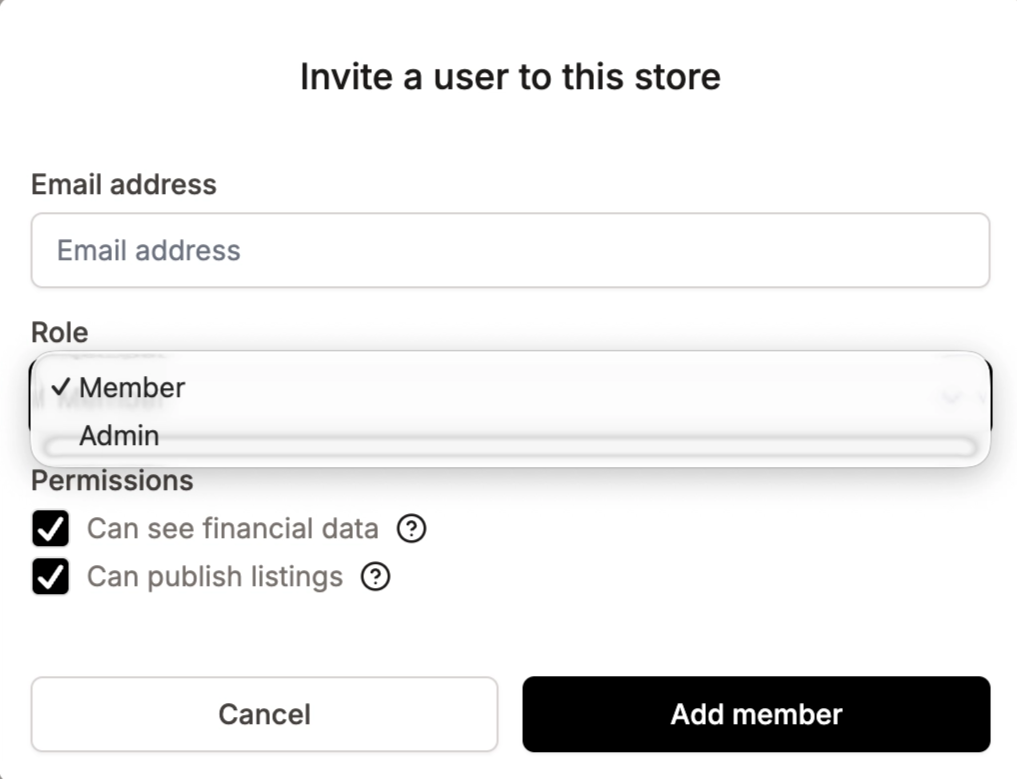
The Listadum Team settings screen with the “Invite member” field. Alt: “Inviting a team member by email in Listadum’s Team settings.
Set the right level of access
Not everyone needs the keys to everything. Decide what each person actually needs before you invite them: a listing writer needs to edit listings, but probably not see your profit numbers. Give each helper the access that matches their job and nothing more. It keeps your sensitive data out of view and makes it painless to add seasonal help without a second thought.
Working across multiple shops, and with a VA
If you run more than one shop, you do not want a separate setup for each. With one login across all your shops, you and your team can switch between them in a click, without juggling Etsy passwords.
And if the person you are bringing on is a virtual assistant, set them up this way from day one. It is the single biggest thing you can do to protect your account and your numbers. We go deeper on hiring safely in how to find a good VA for your Etsy shop.
Want to see what a helper would actually be working on? Run a free Shop Critique and get a clear list of what to fix across your listings, no signup needed.
A real example
Say you have 200 listings and you hire a VA to refresh titles and tags. The old way: you send your Etsy login over chat, they sign in from their country, and two weeks later you wake up to a suspension email. The safe way: you invite them to your Listadum Team, give them listing access, and they work through the backlog while your Etsy account, your payment details, and your revenue stay yours alone. Same work done. None of the risk.
FAQ
Does Etsy let you add multiple users to one shop?
Yes, since September 22, 2026. Etsy’s shared access lets a shop owner invite up to five team members, each with their own Etsy account. They can manage orders, edit and publish listings, and message buyers, but they cannot see your stats or financial information.
Can I give someone access to my shop without sharing my password?
Yes, in two ways. Etsy’s shared access invites them with their own Etsy account. Listadum’s Teams feature gives each person their own Listadum login to work on your listings without ever seeing your Etsy email or password.
Will Etsy suspend my shop if my VA logs in?
It can. Logins from new devices and locations can look like a compromised account to Etsy, and that can trigger a suspension. Giving each helper their own access, through Etsy’s shared access or through Listadum, keeps your Etsy login off other people’s devices.
How many team members can I add?
On Etsy’s shared access, up to five. In Listadum, you can invite as many as you need. There is currently no limit on the number of team members, and Teams is available on Listadum’s Growth plan and above.
Which Listadum plan do I need for Teams?
Teams is part of the Growth plan. You can connect your shop and explore Listadum on the free plan first, then move to Growth when you are ready to invite people.
Can I limit what a team member can see or do?
Yes. You set each member’s access level, so a listing helper does not have to see your financials.
Ready to give your team access without sharing your Etsy password?
Listadum gives each person you work with their own login and the right level of access, across every shop you run. No shared passwords, no handing over your Etsy account. Teams is included on the Growth plan.
Start free · no credit card · connect your real Etsy shop in minutes
Written by Neha Chandelier, Co-founder of Listadum, selling on Etsy since 2020. She writes about Etsy tips and tricks, how to sell on Etsy, and growing a handmade shop.
Related: Manage multiple Etsy shops · Find a good VA · Copy listings between shops