



Etsy can duplicate a listing inside the same shop: in Shop Manager, go to Listings, open the gear menu next to the listing and choose Copy. What it can’t do is copy a listing into a different shop. For that, connect both shops to Listadum, click Copy on the listing and pick the shop it should go to.
There are a few situations where you need to copy listings from one Etsy shop to another.
Maybe you’re launching a more specialized shop and want to move a specific category of products into it. Maybe you’re rebranding and opening a new shop from scratch. Or maybe your shop went down and you’re starting fresh in a new one.
Whatever the reason, you quickly run into the same problem: Etsy has no built-in way to do it.
How to Duplicate a Listing in the Same Etsy Shop
If the new listing belongs in the same shop, you don’t need us. Etsy’s own Copy button does the job:
- Sign in to Etsy and open Shop Manager.
- Go to Listings and find the one you want to duplicate.
- Open the gear menu on that listing and select Copy.
- Etsy opens what looks like the listing editor, but this is the copy, not the original. Change the title, photos or anything else, then select Publish.
You can also select Duplicate in the Listing Tools links at the top of your own public listing page.
The copy is a brand new listing with its own URL, so Etsy charges its $0.20 listing fee when you publish it. A copy in another shop pays the same fee.
Why Copying Etsy Listings to Another Shop Is So Painful
Need the listing in a different Etsy account? You’re on your own. Etsy’s help center says it plainly: there’s no way to move shop info from one account to another.
That means the only official path is to open both shops in separate tabs and start recreating each listing by hand. Title. Description. Tags. Photos. Price. One by one.
It’s not just slow. It’s risky. A missing tag here. A wrong price there. A photo in the wrong order. For sellers with dozens or hundreds of listings, migrating an entire catalog can eat up a full weekend and still leave behind mistakes.
The more listings you have, the more painful it gets.

How to Transfer Etsy Listings to Another Shop with Listadum
Listadum is a tool built for Etsy sellers, and its cross-shop copy feature solves this problem directly.
Here’s how it works.
Connect both of your Etsy shops to Listadum: your source shop and your destination shop. Once connected, both shops live in one dashboard. Switching between them takes one click.
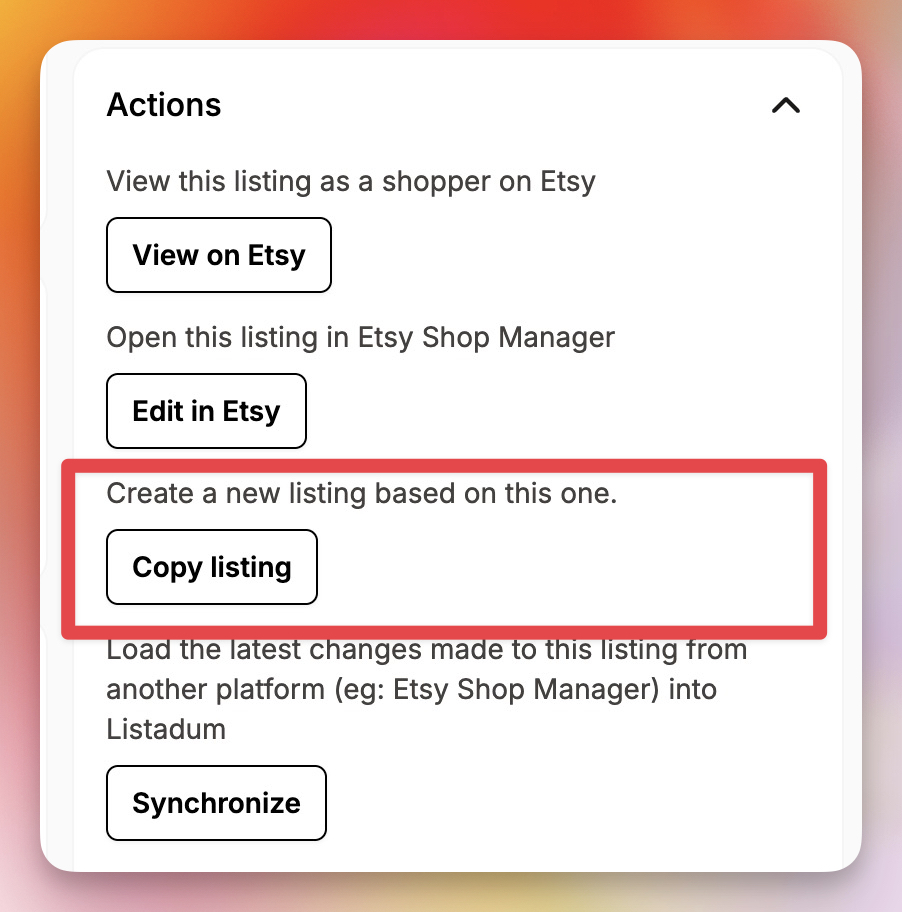
When you’re ready to copy a listing, open your listing from your source shop, and click Copy.
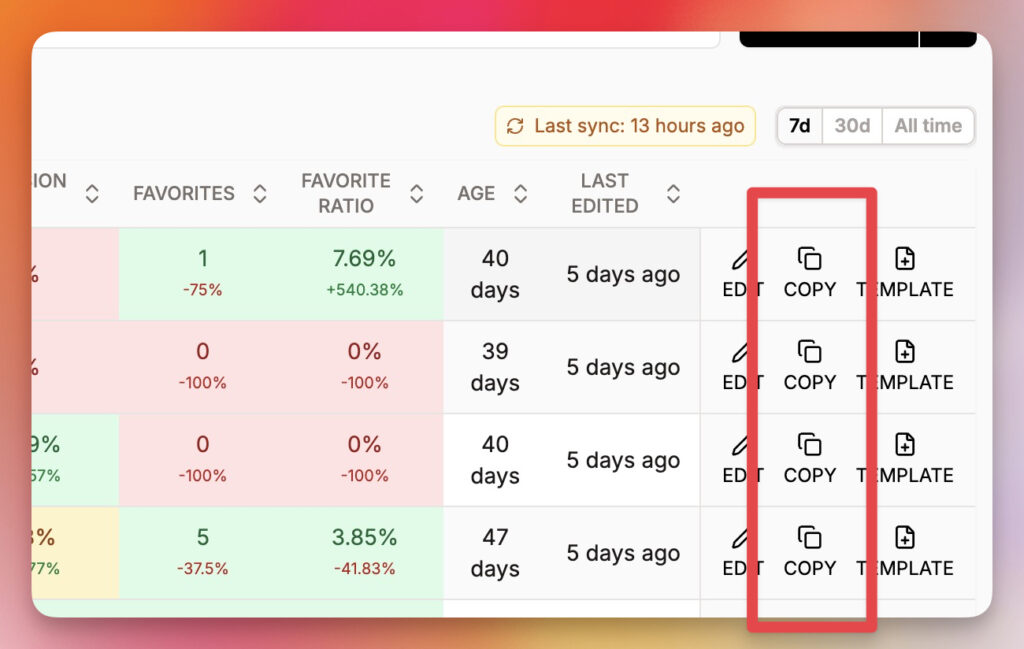
You can also scroll to the last columns of the listing manager and click Copy.
Listadum asks one question: Which shop should this listing go to?
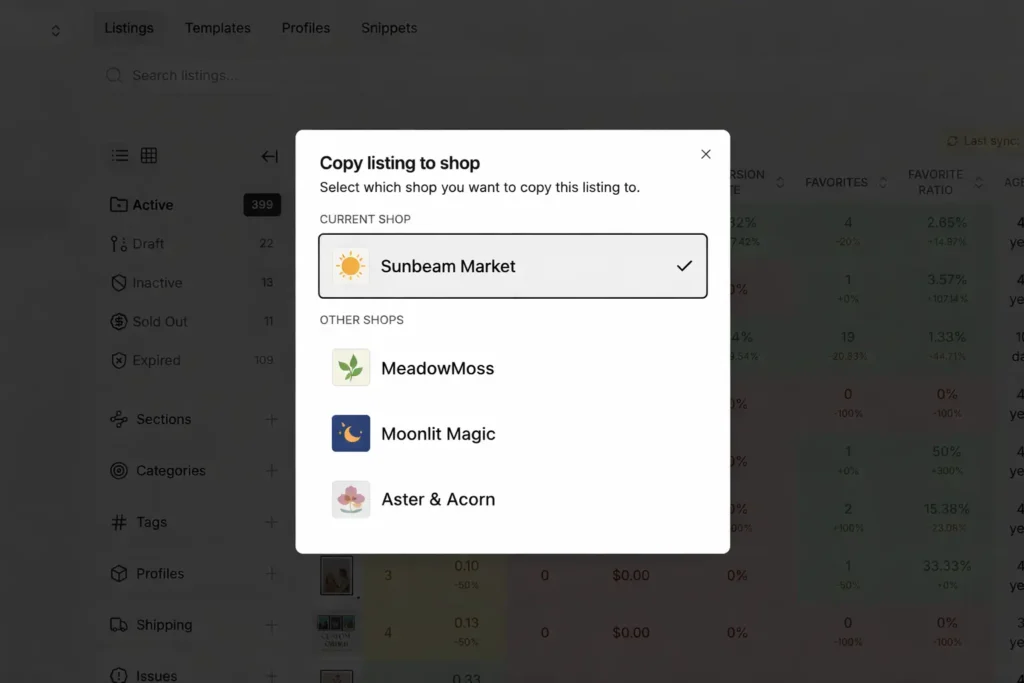
Select your destination shop, confirm, and the listing is transferred. Title, description, tags, photos, and price, all intact.
No copy-pasting. No tab-switching. No recreating anything from scratch.
What Gets Copied and What You Control
When you copy a listing to another shop with Listadum, the listing’s content comes with it:
- Title: exactly as written in the original
- Description: full text, all formatting included
- Tags: all 13, preserved completely
- Photos: every image, in the right order
- Price, quantity and SKU: carried over automatically
- Category, materials, and shipping size and weight: filled in for you
A few settings belong to the old shop: its shop section, shipping profile, return policy, processing profile and production partners. The new shop has its own, so you pick those there. Digital download files aren’t copied either, so add them again on digital listings.
You also choose how the listing lands in the new shop: as a draft so you can review it before it goes live, or you can publish if it’s ready to sell. You stay in control at every step.
Three Situations Where This Saves You Hours
Launching a specialized shop. A lot of sellers run a general shop and eventually want to spin off a niche store focused on one category. Instead of rebuilding those listings from zero, you pick the ones you want, copy them to the new shop, and you’re up and running.
Rebranding. If you’re moving to a new shop name and identity, your listings need to come with you. Copying them one by one through Listadum is a lot faster than recreating 50 or 80 listings by hand.
Starting over in a new shop. If your previous shop is no longer active and you need to get a new one off the ground quickly, Listadum lets you copy your listings over and choose whether to publish them right away or save them as drafts to review first.
Step-by-Step: How to Copy Etsy Listings to Another Shop
Here’s exactly how to do it:
- Connect both shops to Listadum, your source shop and your destination shop.
- Open the listing you want to copy inside your source shop.
- Click Copy and select the destination shop from the list.
- Choose the listing status, draft to review first, or published to go live right away.
- Repeat for each listing you want to move, or copy a batch at once (below).
No CSV exports. No spreadsheets. No complicated workarounds. Just a direct way to move Etsy listings between shops.
Moving a whole category? On Growth, Max or an Agency plan, select up to 25 listings in the listing manager, choose Copy, and pick the destination shop. They open together in Bulk Create, where you check them and save them as drafts, publish them or schedule them all at once.
Questions Sellers Ask About Copying Etsy Listings
Can I duplicate a listing on Etsy to use as a template?
Yes, and Etsy suggests it too: create one listing, then copy it to save time. Start from the listing closest to the new product, so you change as few fields as you can.
Does the original listing change when I copy it?
No. Copying makes a new listing and leaves the original as it is, both on Etsy and in Listadum.
Managing Multiple Etsy Shops Just Got Simpler
Whether you’re expanding into a niche, rebranding, or rebuilding, Listadum keeps all your shops in one place and makes copying listings between them a one-click job.
Your listings represent real work: real research, real writing, real time. Listadum makes sure that work carries over to your new shop, completely and accurately.
Copy listings between shops the easy way
Listadum lets you copy listings from one Etsy shop to another in a few clicks, fields, tags, and all, so you do not rebuild them by hand.
Free plan · no credit card · connect your real Etsy shop in minutes